
Predefined response models
🤦 🤦 🤦 Included in Professional products since ever 😎 😎 😎
- name:
- Predefined response models
- description:
- Pick common answers from a list of predefined replies grouped by categories to update tickets log
- version:
- 1.4.1
- release:
- 2026-08-19
- itop-version-min:
- 3.2.0
Features
This extension is a complement to Send updates by email. It provides a quick way to fill the case log field by picking from a list of “precanned” answers. The answers are organized into Categories and Organizations (supporting multi-tenancy).
-
List of “precanned” replies, for answering quickly the most common questions
-
Organize the answers by category to easily find them
-
Support of multi-tenancy: each Organization can have its list of “precanned” answers.
-
Attachments can be added to the answer for automatic attachment to the email
Revision History
| Release Date | Version | Comments |
|---|---|---|
| 2026-08-19 | 1.4.1 | * Add compatibility with 3.3.0 * N°8196 - Add configuration for incident on ITIL installation * N°9508 - Add tooltips on Predefined response models * N°9750 - Add Demo data in precanned-reply * N°9822 - Invalid class name in module configuration silently ignored * N°9844 - Remove deprecated usage of WebPages - compatibility with 3.3 * N°9855 - Fix default settings (thanks to Hipska!) |
| 2025-01-23 | 1.4.0 | * N°8063 - Remove iApplicationObjectExtension,
move to XML 3.2 * Raise iTop min to 3.2 |
| 2024-12-03 | 1.3.0 | * N°6689 - Proposed replies filtering based on
current object * N°1563 - Enable replies on multi-classes and multiple logs * N°7932 - Add english (GB) translation to iTop * Raise iTop min to 3.1 |
| 2024-08-06 | 1.2.4 | * N°7420 - Correctly handle HTML editors in iTop 3.2 * N°7709 - Updated deprecated calls for iTop 3.2 compatibility |
| 2023-07-01 | 1.2.3 | * compatibility 3.1 - remove import(application/itopwebpage.class.inc.php) |
| 2022-03-22 | 1.2.2 | * Remove deprecated function * Raise iTop min to 2.4.0 * Fix compatibility with iTop 3.0.1+ |
| 2021-12-21 | 1.2.1 | * Add compatibility with 3.0 * Reply now inserted at cursor position instead of the beginning of the text * Now works in iTop 3 quick edit |
| 2020-03-06 | 1.1.5 | Add search criterion |
| 2018-12-19 | 1.1.4 | Support of JQuery 3 (iTop 2.6.0) |
| 2018-06-26 | 1.1.3 | NL translation, default search attributes, iTop 2.5 compatibility |
| 2018-01-26 | 1.1.2 | Add Russian translation. |
| 2016-08-08 | 1.1.1 | Compatibility with iTop 2.3.0 (formatted text) and bug fix to support pagination in the popup dialog for selecting a reply. |
| 2015-09-29 | 1.0.5 | Compatibility with iTop 2.2.0 and custom portals. |
| 2014-12-10 | 1.0.4 | Cosmetic on the module name (internal). |
| 2014-09-25 | 1.0.3 | Better initial sizing and positioning of the dialog box. |
| 2014-09-15 | 1.0.2 | Handling of the dialog's resize. Localization of the dialog's title. |
| 2014-03-11 | 1.0.1 | Integration of the German translation (thanks to ITOMIG GmbH) |
| 2014-03-06 | 1.0.0 | First released version |
Limitations
-
Predefined responses are available only
-
on the Console, not on any portal.
-
on object modification, not on transition forms, even if the caselog field is prompted.
-
-
Limitation on a single class and a single Caselog field was removed from version 1.3.0.
Requirements
This extension requires the Send updates by email extension to be installed as well.
Installation
Use the Standard installation process for this extension.
Configuration
Default
In the iTop configuration file, the administrator defines on which classes the predefined responses selection will be proposed and in which CaseLog the reply will be copied.
  'precanned-replies' => array (
                'targets' => array(
                       'UserRequest' => 'public_log',
                ),
        ),
Add a class
To activate Predefined Requests also on another
class MyClass, you can use:
                'targets' => array(
                       'UserRequest' => 'public_log',
                       'MyClass' => 'my_log',
                ),
Multiple logs
To activate Predefined Requests also on multiple
logs of the same UserRequest class, you can
use:
                'targets' => array(
                       'UserRequest' => 'public_log,private_log',
                ),
To activated a log on a parent class and another log on a child class, you can use:
                'targets' => array(
                       'UserRequest' => 'public_log',
                       'Ticket' => 'private_log',
                ),
For the class UserRequest the behavior is the same, in
both cases the 2 logs will propose the Templates
button. For all other sub-classes of Ticket, just the private log
will propose the Templates button.
Constrains
-
Class must be the class name and not the label.
-
Caselog must be a comma separated list of attribute codes. Each must be Caselog attribute.
Invalid class and caselog are ignored silently when provided in the configuration.
The old module configuration parameters target_class/target_caselog are still understood
  'precanned-replies' => array (
                'target_class' => 'UserRequest',
                'target_caselog' => 'public_log',
        ),
Attachments
In order to add attachments to your Precanned Replies, change
the itop-attachments section in the iTop configuration
file to:
        'itop-attachments' => array (
                'allowed_classes' => array (
                          0 => 'Ticket',
                          1 => 'PrecannedReply',
                        ),
                'position' => 'relations',
        ),
🚧 Is there an impact on this attachment configuration, now that PrecannedReply can be used on multiple classes and caselogs?
Usage
Creating Precanned Replies
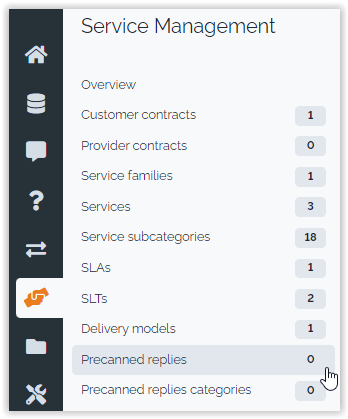
Use the menus under “Service Management” to create and maintain your precanned replies and their categories:
The form for creating a new Precanned reply looks as follows:
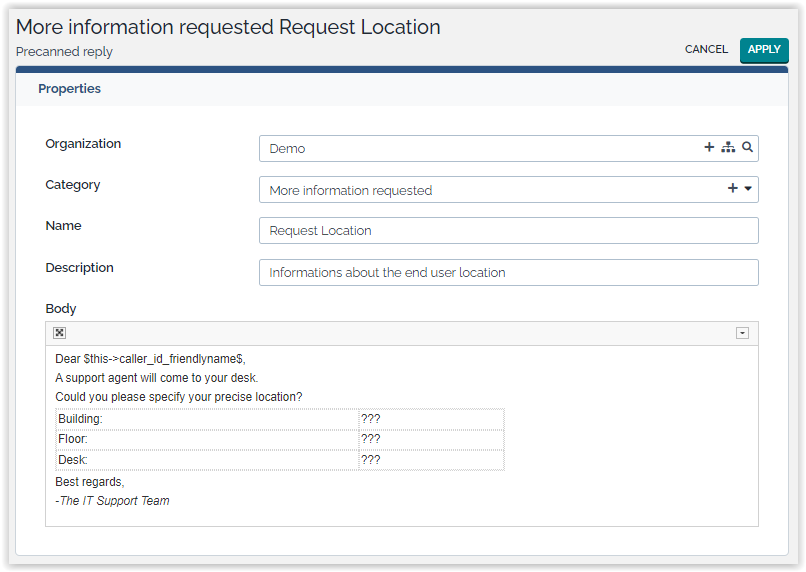
The “Body” field contains the text that will be added into the case log of the ticket when using this precanned replies. If you have configured the attachments to allow them on Precanned Replies, you can add attachments to the Precanned Reply using the “Attachments” tab.
$this->xxxx$ refers to the Ticket in which the
predefined response is copiedIt is possible to send email notifications anytime a user enters a comment in a case log.
If you want to notify the agent when a user updates the log on the portal then use the standard trigger (when updated from the portal)
The natural usage of the feature is in the area of user request management: the agent replies to the requester while updating the request within the iTop GUI.
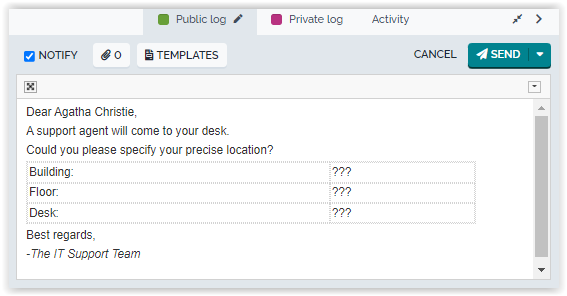
The agent can save time by using precanned replies for the most common questions:
-
Organize the replies by category to easily find them
-
Support of multi-tenancy: each Organization can have its list of precanned replies.
-
Attachments can be added to the answer for automatic attachment to the email
Configure notifications
From the Admin tools/Notifications menu, create a trigger “when log is updated”, and select the expected object class and case log attribute code:
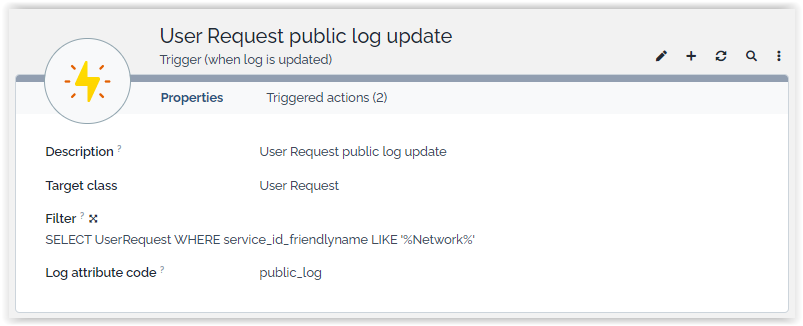
The optional argument 'Filter' is used to specialize the trigger. The filter is an OQL specifying which objects will be taken into account by the trigger. In the given example, the created trigger will be activated only for User Request having a Service named like “…Network…”.
Create an email action for this trigger. This email action can be configured as follows:
-
Status = any active state (e.g 'In production' or 'Being tested')
-
TO =
SELECT Person WHERE id = :this->caller_id -
Body =
Dear $this->caller_id_friendlyname$, … $this->head(public_log)$ … -
… plus other fields required to send notifications
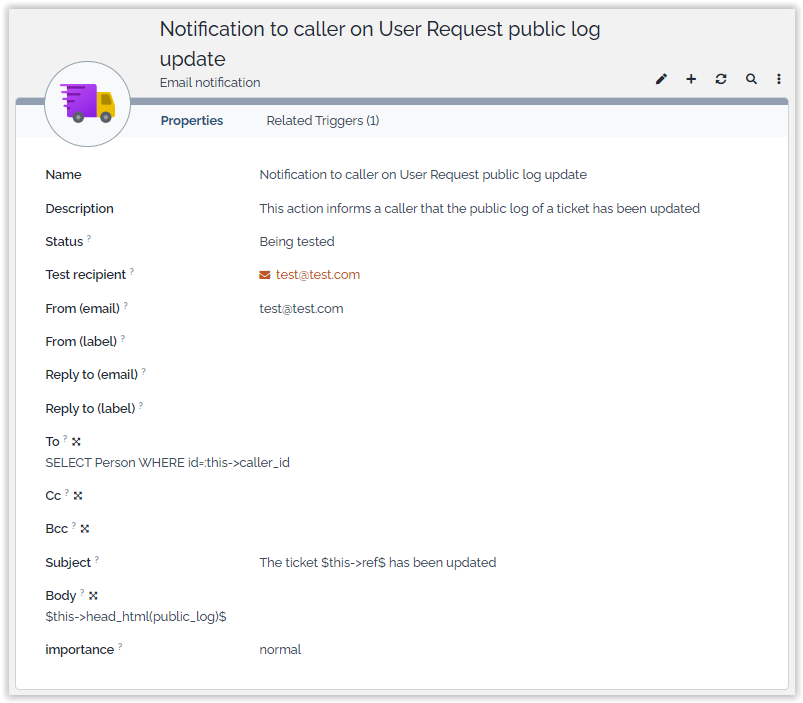
$this->head(public_log)$ adds the latest entry from
the public_log field into the body of the
notification.$this->head_html(public_log)$.Using Precanned Replies
When modifying a Ticket, the public case log contains a new button “Templates” in its header:
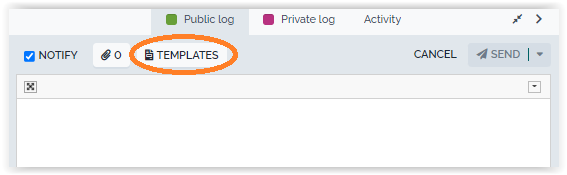
Click on the “Templates” button to select a Precanned Reply from
the list: 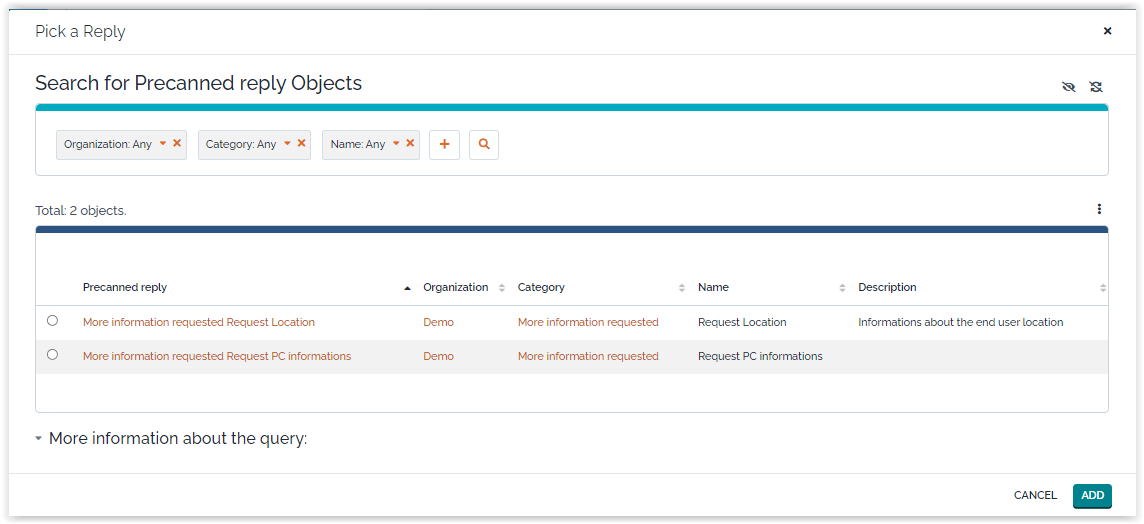
You can use the search criteria at the top to filter the list.
When clicking “ADD”, the answer is written into the case log field. Attachments (if any) to the Precanned reply are added to the answer (the count next to the paper clip icon is increased accordingly):
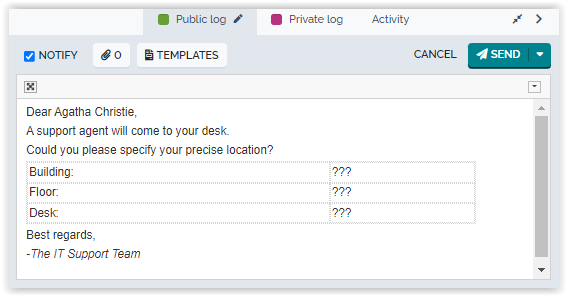
When submitting the modifications to the ticket, the case log will be updated, as if the answer was typed manually.
Selecting attachements
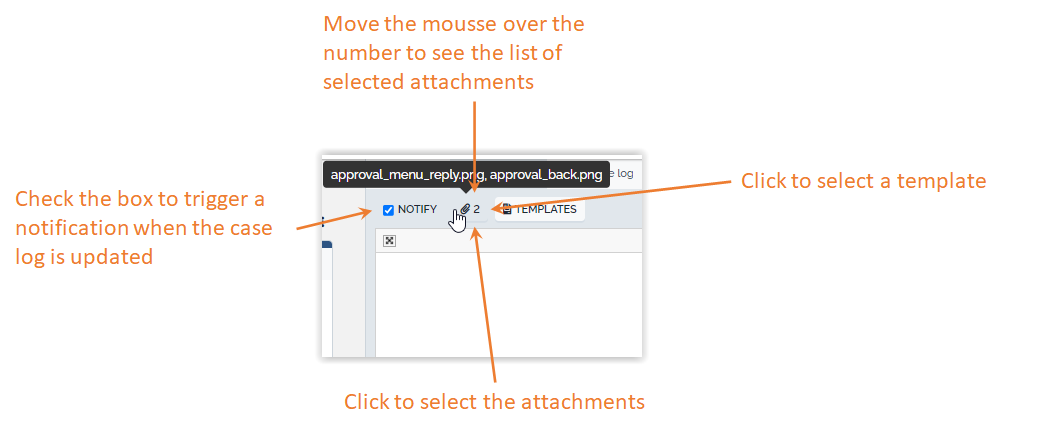
The user can select the attachments to be sent along with the reply, by pressing the “Select Attachments…” button. This displays the following dialog box:
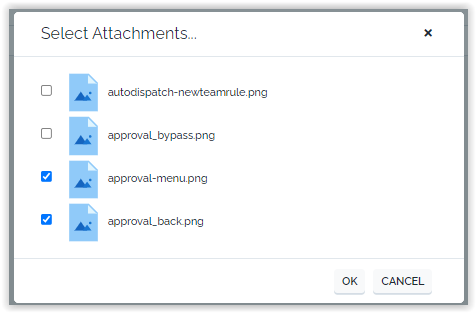
Click on the check-box in front of each desired attachment then click “Ok” to validate the choice.
All new attachments added during the modification of the Ticket will be checked by default. As soon as a new attachment is added to the Ticket (while it is being edited) the number next to the paper clip increases. Moving the mouse over the paper clip icon displays a small tooltip with the list of files that will be sent as attachments with the notification.
If the checkbox “Send the reply by email” is checked, an answer will be sent by email, as explained in Send updates by email.
Question & Answer
Q: Can I filter the precanned replies proposed to the
agent, based on the agent organization for eg?
A: Yes, since version 1.3.0 of the extension, you
can by overwriting the static method
PrecannedReply::FilterApplicableReplies in the Designer
(or with an XML extension)
- class:PrecannedReply
-
    public static function FilterApplicableReplies(DBObject $oObject, DBObjectSearch &$oFilter, string $sLogAttCode = '')
    {
        if (is_subclass_of(get_class($oObject), 'Ticket')) {
            $oContact = UserRights::GetContactObject();
            $oFilter->AddCondition('org_id', $oContact->Get('org_id'));
        }
        return;
    }
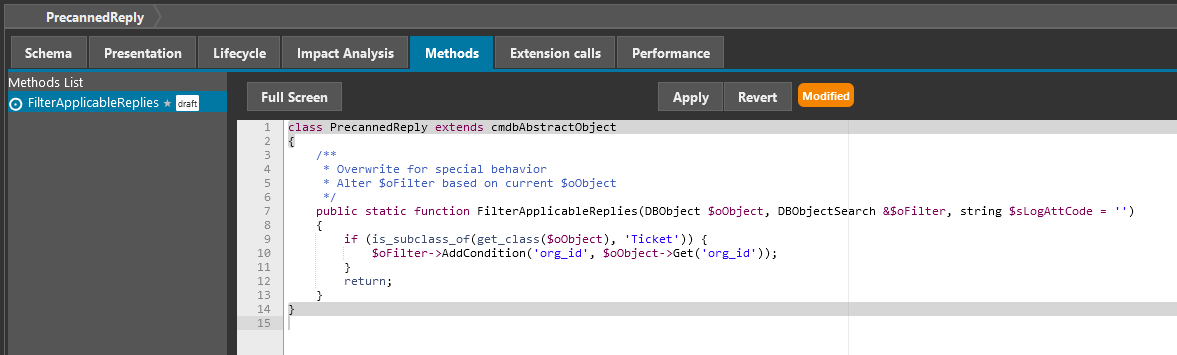
In fact this is just an example, as you can:
-
filter based on reply categories or any additional field that you would have added to PrecannedReply class.
-
filter differently depending on the class and even the log