
MCP Server for iTop
- name:
- Itop-mcp
- description:
- A stand-alone MCP server for iTop
- version:
- 0.0.1
- release:
- 2026-06-13
- itop-version-min:
- 3.2.0
The MCP server is standalone application providing a MCP interface to iTop.
The set of tools advertised by the MCP server, depends on the webservices available on the iTop instance. The complete list of tools is the following:
iTop-. This value can be
changed via the configuration parameter
APP_TOOLS_PREFIX (see below).
This can be useful if your iTop instance is commonly referenced by another name (e.g. 'helpdesk') or if you have several instances of iTop and you need to distinguish them.
| Tool name | Tool description |
|---|---|
| iTop-list-all-classes | This tool lists all the possible classes of objects managed in iTop. |
| iTop-get-class-schema | This tool documents the schema (i.e. the list of all the fields) of a specified class in iTop. |
| iTop-create-any-object | This tool can create any object in iTop. IMPORTANT: before calling this tool use the tool 'list-all-classes' to determine the list of available classes and 'get-class-schema' to obtain information about the schema for a particular class (to get information about the fields, their type and possible values). |
| iTop-create-user-request | This tool creates a User Request in iTop |
| iTop-update-user-request | This tool updates a User Request in iTop by adding an entry to the log and optionally updating the title or the description |
| iTop-update-any-object | This tool can update any object in iTop. |
| iTop-get-object-details-from-id | This tool fetches all the fields of an object in iTop. The object is identified by its class and ID (key) |
| iTop-get-person-from-email | This tool fetches a Person object in iTop from her/his email address |
| iTop-get-person-from-fullname | This tool fetches a Person object in iTop from her/his full name |
| iTop-get-person-from-telephone | This tool fetches a Person object in iTop from her/his telephone number |
| iTop-search-user-request-by-caller-status-start-date | This tool searches for existing UserRequests in iTop based on: - the email of the caller - an optional list of statuses for the UserRequest. - an optional start date - if a start date is specified, the condition/operator: either 'greater_than' or 'less_than' |
| iTop-get-impacted-objects | This tool provides information about the impact of a given object. I.e. it returns a list of objects potentially impacted in case of a modification or a failure of the specified object |
| iTop-get-depends-on-objects | This tool provides information about objects from which the given object depends I.e. it returns a list of objects whose modification or failure may have consequences on the specified object |
| iTop-search-in-natural-language | This tool performs a search (multi-criterion
search) in iTop from a sentence in natural language Example: - What
are the persons who do not belong to any team? Note: This tool requires the extension “AI based OQL Generator” installed on iTop. |
| iTop-apply-stimulus-to-any-object | This tool can apply a stimulus to change the state of an iTop object driven by a life-cycle (typically Tickets). |
Features
In this first version, the MCP server only provides a series of tools (no prompts, no resources).
Revision History
| Version | Release Date | Comments |
|---|---|---|
| 0.0.1 | 2026-07-07 | First public version |
Limitations
-
This version only supports token authentication. oAuth authentication is not yet supported.
-
The only protocol supported is streamable HTTPS
Requirements
-
A web server with PHP 8.2 (with the extensions
iconvandctype) for installing the MCP server. -
An iTop instance with token authentication enabled, to communicate with, using the REST/JSON webservices
-
The
datamodel-production.xmlfile from your iTop instance (can be a symlink if both iTop and the MCP server are located on the same server)
The MCP server mostly performs the translation of the MCP requests into iTop REST/JSON calls, so the amount of processing and memory involved are quite small. Of course they depend on the planned use of the MCP, but a medium size virtual machine should be sufficient for most use cases.
Installation
The MCP server is a standalone PHP/Symfony web application. This
means that only the content of the public
directory should be accessible via HTTP(S).
The package of the application already contains all the dependencies, so there is no need to run composer when deploying. Just copy the content of the zip file to the web server.
To know more about how to deploy Symfony applications, refer to the Symfony documentation: How to Deploy a Symfony Application.
Configuration
The configuration parameters are defined in the
.env file at the root of the project. The good
practice is to create a file .env.local (at the root
of the project as well) to overload the default settings. Basically
you'll just need:
- .env.local
-
APP_ITOP_URL="https://your-itop.com/"
#APP_ENV="prod"
# Optional, adjust the log level, if needed
#APP_LOG_LEVEL="info"
# Optional, change the prefix for all tools. This can be useful to refer to iTop with a different name (e.g. Helpdesk)
#APP_TOOLS_PREFIX="iTop-"
data/datamodel-production.xml
from your iTop to the location
data/datamodel-production.xml of the MCP server.
Moreover, if the file is a copy and not a symlink, you will have to update this file each time the datamodel of your iTop changes (MTP, upgrade)
Usage
After you have configured the iTop URL and the
datamodel-production.xml file, open your browser and
navigate to the MCP server URL. The page that should appear
is shown below:
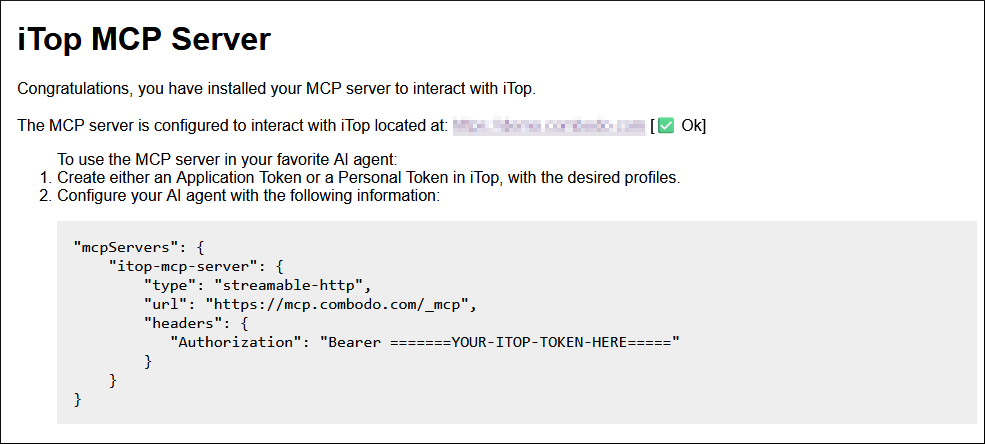
Check that the iTop URL is correct (if not, a red mark ❌️ will be displayed instead of the green check-mark ✅Ok)
Then create a token in iTop (either a personal token or a user token) and configure your AI client as indicated on the page:
- mcp-servers.json
-
"mcpServers": {
    "itop-mcp-server": {
        "type": "streamable-http",
        "url": "https://mcp-server-url",
        "headers": {
           "Authorization": "Bearer =======YOUR-ITOP-TOKEN-HERE====="
        }
    }
}
Caching
The tools discovery and data‑model parsing can be slow, so their results are cached on disk with a time‑to‑live of 3600 seconds.
To clear this cache, connect to the server and run the following command from the project’s root directory:
./bin/console cache:clear;./bin/console cache:pool:clear --all