
Data collector for Proxmox
- name:
- Data collector for Proxmox
- description:
- Synchronize Proxmox managed devices into iTop
- version:
- 1.0.0
- release:
- 2026-04-14
- itop-version-min:
- 3.2.0
- code:
- combodo-proxmox-data-collector
- state:
- Prototype
- php-version-max:
- 8.3
This stand-alone application enables administrators to automatically feed iTop with relevant and accurate information from their Proxmox infrastructure. It must be used with the Data model for Proxmox that brings dedicated Proxmox elements to iTop's CMDB.
Features
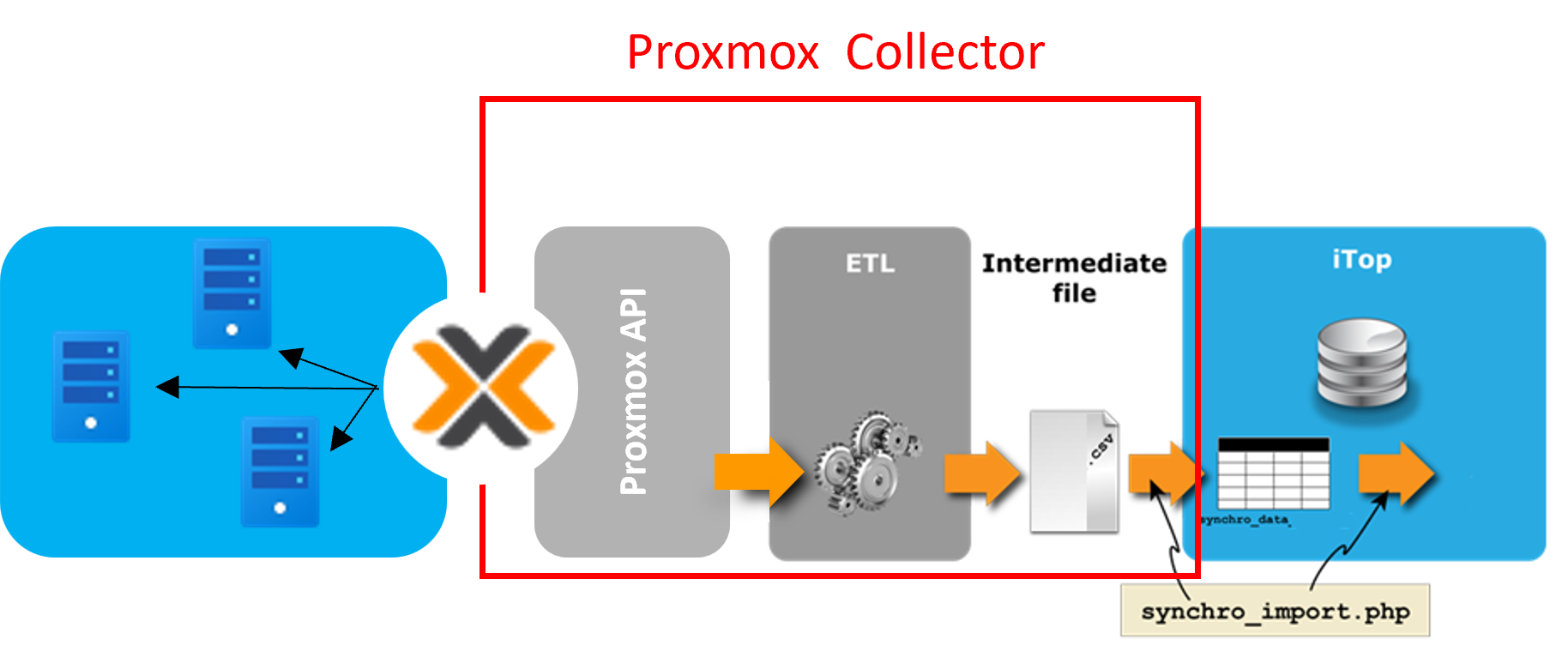
The Data collector for Proxmox is a stand-alone PHP software that extracts information about a set of configuration items (CIs) from the Proxmox infrastructure and synchronizes it with the iTop's CMDB.
-
Collection of CI informations is done through Proxmox standard web services,
-
Synchronization follows iTop's built-in Data Synchronization mechanism.
The collector currently focuses on the following classes of objects, for which collection can be activated or deactivated on an individual basis:
-
OS Family
-
OS Version
-
Proxmox Cluster
-
Proxmox HA Group
-
Proxmox Node / Serveur
-
Physical Interface
-
Proxmox Disk
-
Proxmox Storage Type
-
Proxmox Storage
-
Virtual machine
-
Proxmox Container
-
Logical Interface
-
IPv4 Address - Requires TeemIP / IPAM for iTop extension
-
IPv6 Address - Requires TeemIP / IPAM for iTop extension
-
Link Logical Interface / P address - Requires TeemIP / IPAM for iTop extension
The collection mechanism can be extended.
Revision History
| Version | Release Date | Comments |
|---|---|---|
| 1.0.0 | 2026-01-14 | First version |
Limitations
None
Requirements
Usage of the collector requires you to comply with a few points:
-
An access to the Proxmox web services API must be granted,
-
An access to the iTop web services API must be granted as well,
-
The Proxmox objects synchronized by the collector must exist in iTop as CMDB CIs:
-
For that purpose the Data model for Proxmox extension must be installed on iTop,
-
IPv4 and IPv6 Addresses do need TeemIP / IPAM for iTop,
-
-
From a system standpoint:
-
You'll need to comply with the requirements expressed in the Data collector Base documentation.
-
PHP version should be 8.1, 8.2 or 8.3.
-
Installation
Simply expand the content of the zip archive into a folder on the machine where the collector will be run.
Configuration
The configuration of the application is built by concatenating 4 files:
-
conf/params.distrib.xml that is provided by the collector framework, Data collector Base. It should not be modified.
-
collectors/params.distrib.xml that holds the entries that are specific to the Data collector for Proxmox. It should not be modified.
-
collectors/extensions/params.distrib.xml that holds entries that have been created and added by the customer to answer its specific needs. This file is optional.
-
conf/params.local.xml where the collector can be adapted to the specific customer needs.
The collectors/params.distrib.xml configuration file contains parameters that must (for some) or can (for others) be changed when configuring the collector, which is done via the conf/params.local.xml file.
<?xml version="1.0" encoding="UTF-8"?><!-- Default values for parameters. Do NOT alter this file, use params.local.xml instead -->
<parameters>
        <!-- Connection parameters -->
        ...
           List of parameters to connect to the remote Proxmox application
        ...

        <!-- Proxmox classes parameters -->
        ...
           List of Proxmox classes with their parameters
        ...

        <!-- Class collection sequence -->
        ...
           List of classes to collect with the rank in the collection process
        ...

        <!-- Global parameters -->
        ...
           List of parameters that are global to the collector
        ...

        <!-- Data synchronization parameters -->
        ...
           Placeholders for the synchro data sources
        ...

        <!-- Mapping tables -->
        ...
           Set of mapping tables
        ...

</parameters>
The collectors/extensions/params.distrib.xml configuration file contains the parameters used to collect additional classes required by a customer.
<?xml version="1.0" encoding="UTF-8"?><!-- Default values for parameters. Do NOT alter this file, use params.local.xml instead -->
<parameters>
        <!-- Additional Proxmox classes parameters  -->
        ...
           List of additional classes to collect
        ...

        <!-- Class collection sequence -->
        ...
           List of additional classes to collect with the rank in the collection process
        ...

</parameters>
Connection parameters
This set of parameters is required to connect to the iTop application or the Proxmox environment. Some of them must or may be adapted to meet customers' own environment.
| Parameter | Meaning | Sample value |
|---|---|---|
| itop_url | URL to the iTop Application | https://localhost/myitop |
| itop_login | Login (user account) to connect to iTop. Must have admin rights with rest profile to execute the data synchro | admin |
| itop_password | Password for the iTop account | admin_pwd |
| itop_token | Token defined in iTop for a given user. Please, refer to the Authentication by Token extension | |
| itop_login_mode | Redefine the login_mode defined in URLs that access iTop | |
| proxmox_host | Host name or IP of the Proxmox cluster | my.proxmoxserver.com |
| proxmox_port | Port to use to reach the cluster | 8006 |
| proxmox_authentication_type | Proxmox provides 2 types of login: ticket_cookie or api_tokens | ticket_cookie |
| proxmox_username | Login with enough priviledges to connect to the Proxmox application | root@pam |
| proxmox_password | Related password | myproxmoxpwd |
Proxmox classes parameters
In addition to the connection parameters described above, the collectors/params.distrib.xml file provides the list of all Proxmox classes that need to be discovered together with their subset of parameters that should be synchronized within iTop. Since Proxmox data retrieval is performed in JSON format, this list must be aligned with the requirements expected by the standard JSON collector defined in the data collector base.
Looking, for instance, at the Virtual Machine class, we have:
    <!-- Virtual machines -->
    <itopvirtualmachineproxmoxcollector>
        <jsonfile>$jsonfile_path$/ProxmoxVirtualMachine.json</jsonfile>
        <path>data</path>
        <fields>
            <primary_key>id</primary_key>
            <business_criticity>business_criticity</business_criticity>
            <cores_per_socket>cores_per_socket</cores_per_socket>
            <cpu>cpu</cpu>
            <cpu_model>cpu_model</cpu_model>
            <description>description</description>
            <host_id>node</host_id>
            <logicalvolumes_list></logicalvolumes_list>
            <managementip>managementip</managementip>
            <managementip_id>managementip</managementip_id>
            <name>name</name>
            <numa>numa</numa>
            <org_id>org_id</org_id>
            <osfamily_id>ostype</osfamily_id>
            <osversion_id>ostype</osversion_id>
            <power_state>power_state</power_state>
            <proxmoxhagroup_id>hagroup</proxmoxhagroup_id>
            <ram>memory</ram>
            <socket_count>socket_count</socket_count>
            <status>status</status>
            <uuid>vmid</uuid>
        </fields>
        <defaults>
            <business_criticity>medium</business_criticity>
            <logicalvolumes_list></logicalvolumes_list>
            <org_id>Demo</org_id>
            <status>production</status>
        </defaults>
    </itopvirtualmachineproxmoxcollector>
| Parameter | Meaning | Sample value |
|---|---|---|
| jsonfile | Define path to the JSON file where Proxmox data have been extracted and saved | $jsonfile_path$/ProxmoxVirtualMachine.json |
| path | Path to find the data to synchronize in JSON file | data |
| fields | List of objects' fields to be considered by the synchro engine | See xml default above |
| defaults | List of default values to be used, if required | See xml default above |
The list defined within the <fields> section must comply with the following syntax: <itop_attribute_name>proxmox_attribute_name</itop_attribute_name>
With:
-
The XML tag defines the exact name of an iTop attribute for the class, such as host_id, org_id, or uuid in the example above.
-
The value contained in the XML tag defines the name of the attribute in the Proxmox environment.
Class collection sequence
This section defines the list of classes that will be collected and in which order. It also allows you to disable the collection of a class.
  <collectors_launch_sequence type="array">
    <!-- OS Families -->
    <collector>
        <name>iTopOSFamilyProxmoxCollector</name>
        <enable>yes</enable>
        <rank>1</rank>
    </collector>
    <!-- OS Versions -->
    <collector>
        <name>iTopOSVersionProxmoxCollector</name>
        <enable>yes</enable>
        <rank>2</rank>
    </collector>
    <!-- IPv4 Addresses -->
    <collector>
        <name>iTopIPv4AddressProxmoxCollector</name>
        <enable>yes</enable>
        <rank>3</rank>
    </collector>
    <!-- IPv6 Addresses -->
    <collector>
        <name>iTopIPv6AddressProxmoxCollector</name>
        <enable>yes</enable>
        <rank>4</rank>
    </collector>
    <collector>
        <name>iTopProxmoxStorageTypeProxmoxCollector</name>
        <enable>yes</enable>
        <rank>4</rank>
    </collector>
    <!-- ProxmoxClusters -->
    <collector>
        <name>iTopProxmoxClusterProxmoxCollector</name>
        <enable>yes</enable>
        <rank>10</rank>
    </collector>
    ...
  </collectors_launch_sequence>
| Parameter | Meaning | Sample value |
|---|---|---|
| name | Name of the Proxmox class collector | iTopVirtualMachineProxmoxCollector |
| enable | Enable or disable its collect | yes / no |
| rank | Relative rank in the collection | 70 |
Global parameters
This section contains some settings that are global to the application.
<?xml version="1.0" encoding="UTF-8"?>
  <parameters>
    ...
    <jsonfile_path>/var/www/html/dev/collectors/proxmox/proxmox-collector/data</jsonfile_path>
    <manage_ipv6>no</manage_ipv6>
    ...
  </parameters>
| Parameter | Meaning | Sample value |
|---|---|---|
| jsonfile_path | Path where collected json data will be stored | /var/www/html/dev/collectors/proxmox/proxmox-collector/data |
| manage_ipv6 | Defines if IPv6 should be considered or not | no |
Synchro data source parameters
These are dedicated to the synchronization data sources that the collector creates. Some of them must or may be adapted to meet customers' own environment.
| Parameter | Meaning | Sample value |
|---|---|---|
| name_prefix | String used to prefix the name of all Proxmox synchro data sources | Proxmox |
| name_postfix | String used to postfix the name of all Proxmox synchro data sources | Discovery |
| class_synchro_name | Name of the synchro as it will appear in iTop | $name_prefix$ Proxmox Clusters $name_postfix$ |
| full_load_interval | The delay (expressed in seconds) between two complete imports of the data. The objects which have not been detected by the collector during a timespan longer than this interval will be considered as obsolete and marked as such in iTop. Adjust this value depending on the scheduling recurrence. | 604800 |
| synchro_status | Default status for the synchro data source | production |
| synchro_user | If the user account used for running this synchronization is not an Administrator, then its login must be specified here, since iTop allows only the administrators and the specified user to run the synchronization. | |
| contact_to_notify | The email address of an existing contact (person or team) in iTop to be notified of the results of the synchronization. | it.support@demo.com |
Mapping tables
This section groups the mapping tables used by the collector.
| Parameter | Meaning |
|---|---|
| server_status_mapping | Mapping table for the servers' status |
| server_quorum_status_mapping | Mapping table for the quorum status on servers |
| server_powerstate_mapping | Mapping table for the servers' power state |
| os_family_mapping | Mapping table for the OS Family |
| os_version_mapping | Mapping table for the OS Version |
| virtual_machine_numa_mapping | Mapping table for the VMs' numa |
Should you require further details on how mapping tables should be built and use, please refer to the Data mapping chapter of the Data collector Base documentation.
Usage
The launch of the Proxmox collector will be driven by the command and parameters defined in the usage section of iTop Data collector base. Once launched:
-
The configuration files are consolidated.
-
The collection plan is built, based on the list of classes that have been enabled in the configuration file.
-
Synchronisation data sources are created or updated if required.
-
The collector authenticates and connects to Proxmox, retrieves all the required data from it and stores it in the ProxmoxData.json file under the <collector>/data directory.
-
For each of the classes that should be collected, a dedicated json file is built from the data extracted from Proxmox.
-
The collector then builds csv files with all the data that are required in iTop.
-
Synchronisation runs and the Proxmox objects are pushed to iTop where they will be created or updated.