
Case Exchange Base
🤦 🤦 🤦 Combodo's customers only 😎 😎 😎
- name:
- Case Exchange Base
- description:
- SDK for developping powerful case exchanges between iTop and any other type of application (inc. other
- version:
- 2.4.0
- release:
- 2026-07-30
- itop-version-min:
- 3.2.0
- code:
- case-exchange-base
- state:
- stable
- diffusion:
- Combodo Site
Hand over a ticket between your iTop and another iTop… or any other application.
Features
This toolkit combined with an extension to defined Your iTop can be connected to any number of remote applications.
APIs are available to request operations, for a given remote application:
-
Create a counterpart object
-
Update the counterpart object
-
Apply a stimulus onto the counterpart object
The ticket gets synchronized as much as possible: the information gets transferred ASAP, but if the transfer fails for any reason, the information gets queued and retries are performed in the background. For instance, this leaves some time to for the remote application to restart (outage) or for an operator to update a data mapping table.
The module can be used as is, or some classes can be extended for seamless integration into your data model and the connectivity between iTop and the remote application
A new type of trigger provides you with a standard way to send notifications when something goes wrong.
Revision History
| Version | Release Date | Comments |
|---|---|---|
| 2.4.0 | 2025-04-24 | * iTop min 3.2.0, add compatibility with PHP 8.4 &
iTop 3.3.0 * N°3817 - Audit and fix calls to deprecated jQuery method * N°8117 - Send outgoing messages on object not directly link to incomming message - in synchronous mode * N°8510 - Automatic renewal of OAuth tokens stops unexpectedly * N°8549 - Security enforcement * N°8744 - Fix synchronous synchronization of child tickets modified by the parent ticket * N°9256 & N°9291 - Add compatibility with PHP 8.4 * N°9438 - Secured CEXEvent class by adding categories grant_by_profile and silo * N°9617 - Send EVENT on data export for traceability * N°9625 - Remove unnecessary session reset as it is already done by the core * N°9842 - Remove usage of obsolete WebPages - Add compatibility iTop 3.3 |
| 2.3.0 | 2025-07-28 | * iTop min 3.1.1 combodo-cex-itop * N°6573 - Specify name of Remote Application in Events log * N°8211 - Allow token deletion - useful in case of failure while refreshing the token combodo-case-exchange-base * N°6433 - Case Exchange - Be able to send Public_Log to create ticket without modification * N°6439 - Case Exchange - Be able to send multiple attributes without modification attributes * N°6493 - Call method callback during a case exchange call * N°6497 - Case Exchange - Be able to update an attribut read-only * N°6573 - Specify name of Remote Application in Events log * N°7760 - CaseExchange Logs obfuscates passwords * N°8159 - Add tests on Case Exchange V2 * N°8471 - Log in debug when the mapping by OQL expects a field missing in the incoming message * N°8214 - CEX: Allow inbound mapping for attributes case log, text and scalar * Change from iApplicationObjectExtension to Events * Add new events for CEX |
| 2.2.5 | 2025-01-30 | * N°7760 - CaseExchange Logs contains
passwords * N°8095 - case exchange does not work in synchronous mode with iTop3.2 * N°8117 - Case exchange - be able to send outgoing messages on object not directly link to incoming message |
| 2.2.3 | 2023-04-24 | * N°6122 - Case exchange MTP from Designer fails |
| 2.2.2 | 2023-09-03 | * N°5372 - Multiple enhancements: iTop to iTop connector Allow multiple Remote applications on the same XML definition Display remote information as a tooltip in synchronized objects Use URL User definition to go to remote objects Log of undefined incoming requests Allow multiple conditions on outbound scenarios Add 3 new conditions: - Scenario\Condition\ObjectValue to check current object values - Scenario\Condition\Remote to check if the object must or must not be already synchronized - Scenario\Condition\Synchronize to check if an object synchronization was asked by an action * N°5705 - iTop - Fatal Error in CEX on broken inline image |
| 2.2.1 | 2022-11-08 | - SDK V2 - Compatibility iTop 3.0 |
| 2.1.2 | 2022-11-08 | Fix Inline image fatal error |
| 2.1.1 | 2022-05-13 | Fix CEX V1 mapping |
| 1.4.5 | 2020-03-11 | - Enable Notification management delegation - Translations - Reorganize admin. console menus: Move to “Configuration tools” in iTop 2.7+ |
| 1.4.2 | 2018-10-16 | Fix compatibility with iTop 2.4+ |
| 1.4.1 | 2018-06-26 | Now search also archived message |
| 1.4.0 | 2017-02-20 | Added support for formatted text between iTop instances that can be either in v2.3 or older. Note: “Force plain text” must be checked if the remote application is an iTop 2.2 and below. |
| 1.3.1 | 2017-02-21 | Fixed regression introduced with v1.3.0 that made attachement-related messages crashed. |
| 1.3.0 | 2017-01-11 | Enhanced support of third-party appplications: - Delegate attachement creation/deletion to the remote app - Display the icon (chain) even if only the friendly name of the counterpart object is known - Support of iTop 2.3 formatted text, by the mean of the utility class InlineImageExtractor, to replace inline images with text and send attachments if feasible |
| 1.2.0 | 2016-11-07 | Added file transfert transport mode. |
| 1.1.0 | 2016-05-30 | Added a trigger “on case log updated by a remote application”. |
| 1.0.4 | 2016-02-08 | Fixed a compatibility issue with iTop 2.2.0. Still backward compatible with older versions of iTop. |
| 1.0.3 | 2015-12-07 | Enable the developpement of a shake hand protocol toward a non-iTop remote application, Correctly escape error messages in the logs (html entities not displayed) |
| 1.0.2 | 2015-11-20 | Fixed bug with the remote mapping based on an OQL and for N-N linksets. The symptom was “Error on local mapping” |
| 1.0.1 | 2015-08-10 | Added options for the URL to the counterpart ticket: can be a specific URL, can be disabled, can be a link to the customer portal |
| 1.0.0 | 2015-07-02 | First version |
Limitations/Not yet implemented
Localization of the error messages.
For HTTP/HTTPS, requires curl.
Complete the connectivity test with:
-
an option to establish the connectivity (copy the UUIDs between the local and the remote)
-
check the consistency of attachment settings
-
enabled/disabled,
-
local max size = remote upload_max_filesize
-
remote post_max_size >= 1.6 x remote upload_max_filesize
-
Requirements
iTop 2.7.0
Installation
Can be used for case exchange
-
with another iTop, see here: combodo-cex-itop
-
or in conjunction with a remote application connector: Service Now
You can also develop your own remote application connector.
Configuration
The following settings can be adjusted in the iTop configuration
file, in the section combodo-case-exchange-base:
| Parameter | Type | Description | Default Value |
|---|---|---|---|
| response_timeout | integer | Asynchronous transports only (remote end replying asynchronously ; this is NOT the case with the built-in HTTP/rest transport): time (seconds) for the other end to reply. An error is issued after that delay. | 120 |
| synchronous | boolean | Set to true to start sending the operation as soon as →Launch() is invoked. This is fine when developing your case exchange solution. In production, it can be more relevant to start sending asynchronously so as to let the agent quickly regain access to the ticket, independently from network timeouts | true |
| log_useraction | boolean | Enable logging (trace are always enabled) when a user is manipulating the operations queue | true |
| log_error | boolean | Enable logging (trace are always enabled) when an error occurs on an operation | true |
| log_send | boolean | Enable logging (trace are always enabled) of sent data (transport level) | true |
| log_receive | boolean | Enable logging (trace are always enabled) of received data (transport level, not related to any operation) | true |
| file_cron_idle_periodicity | integer | File transport: Time (in seconds) between active remote apps checks. This is to prevent having the background task running too often when it is not necessary. | 600 |
| file_cron_active_periodicity | integer | File transport: Periodicity of file scan (incoming and outgoing timed out files) in seconds when there is an active remote app. | 20 |
| display_messages_to_the_operator | boolean | allow to display synchronization status in the console on synchronous exchanges | true |
| debug | boolean | Enable debug trace (Mostly in the cron) | false |
The following settings can be adjusted in the iTop configuration
file, in the section combodo-queue-base:
| Parameter | Type | Description | Default Value |
|---|---|---|---|
| monitor_profiles | string | CSV list of profiles allowed to monitor the queue of operations | Administrator, Service Manager |
Attachments are configured on the remote application:
-
Attachment max size: Limits the size of attachments that can be pushed to the counterpart object. Uses the same syntax as the PHP configuration file '100K' or '16M' or '321G'. Set '0' to disable the synchronization of attachments.
-
Attachment max size should be set to the limit displayed on the remote application, when adding an attachment.
-
Pay attention to the value of the PHP setting post_max_size on the remote application: it must be greater than 1.6 x upload_max_filesize (this is because the file gets base 64 encoded for transmission onto the remote end)
-
Enabling the attachment to other way (receive attachments) is currently configured on the other side.
Usage
Connect your applications
Existing remote applications are:
But then you must define your scenarios and code them in XML,
using the syntax explained in this wiki, for configuring the iTop
part of the Case Exchange.
For configuring the other part of the scenarios on a different
ticketing system, you will need to have that knowledge, we don't
have it.
Setup notifications
New type of trigger: Trigger (on Case Exchange Error)
In the notification, the following placeholders are available:
| Placeholder | Description |
|---|---|
| $this->xxx$ | Source ticket |
| $remote->xxx$ | Remote Application |
| $error_type$ | Error type (localized label) |
| $error_message_field$ | Error message |
| $current_user->xxx$ | Logged in user |
| $current_contact->xxx$ | Logged in contact. This placeholder is missing if there is no contact for the current user… use with care! |
| $error_contact->xxx$ | One of the three error contacts configured on the remote application, depending on the type of error that triggered the event |
Note: those errors happen when all the retries have been attempted. Therefore, most of the time, an error will occur in the context of the execution of a background task (cron)… the user is then NOT meaningful.
It is advised to use the attributes outage_contact_id, mapping_contact_id and integration_contact_id so as to send the notification to the relevant people (in fact, those external keys are currently not used by the framework).
Customization
This extension is just a toolkit and does nothing by itself.
Some extensions designed for particular scenarios exists already and can be used as is or as a basis.
The following sections describes all the steps to write your own
set of scenario in XML.
It's a simple extension, just make sure that it depends on this one
and provide a datamodel.xml file and that's it.
Concepts
-
remote_application: define the parameters (credentials, …) of the remote system for the exchange of objects. The remote application is a datamodel object (stored in database) linked to an exchange definition in XML.
-
synchronized_class: class of iTop objects being synchronized with a remote system defined by a remote application object.
-
object_attributes: the attributes of the current local synchronized object in the XML definition.
-
local to remote link: an iTop object providing information on the synchronization with the remote counterpart of the current synchronized local object (class CEXLocalToRemoteObject). This link is used for sending the messages to the correct remote objects and also to retrieve the local object concerned by an incoming message.
-
link_attributes: the attributes of local to remote link object in the XML definition.
-
remote_fields: the fields of the messages sent or received to/from the remote system.
-
remote_status: the status received from the remote system during an exchange.
-
mapping: (global, attribute or field) provides a way to transform the data exchanged between the local and remote systems in order to communicate.
Prepare for connectivity
Depending on the connectivity to the remote application you'll have to configure correctly all the credentials in the remote application object and test your connectivity using the page:

Flow


Remote application XML
Configure the remote application in the “module_design” part of the XML definition of your iTop instance
<?xml version="1.0" encoding="UTF-8"?>
<itop_design xmlns:xsi="http://www.w3.org/2001/XMLSchema-instance" version="1.7">
        <module_designs>
                <module_design id="case-exchange" xsi:type="case-exchange" _delta="must_exist">
                        <remote_applications>
                                <remote_application id="my-remote-application" xsi:type="MyCEXRemoteApplicationClass" _delta="define">
                                        <global>
                                          ...
                                        </global>
                                        <synchronized_classes>
                                          ...
                                        </synchronized_classes>
                                </remote_application>
                        </remote_applications>
                </module_design>
        </module_designs>
</itop_design>
The remote application contains the following sections:
-
“global” to define operations not linked to a class like “Hand Shake”
-
“synchronized_classes” to define all the classes to be synchronized with the remote application.
Remote application reference
| Tag | Usage | Description |
|---|---|---|
| <module_design id="case-exchange" xsi:type="case-exchange"> | mandatory | Container node for a set of design data. The identifier must be unique and match the name of the module case-exchange, but any string is allowed provided that it does not contain slashes or backslashes |
| <remote_application id="name" xsi:type="CEXRemoteApplication"> | mandatory | Remote application configuration. *name* must correspond to the *UUID* field of the *Remote iTop* object |
| <global> | mandatory | Service messages corresponding to not synchronized objects (shake-hands, attachments) |
| <inbound> | mandatory | Inbound service messages |
| <operations> | mandatory | Shake-hands and attachments operations |
| <operation id="name" xsi:type="Combodo\iTop\Extension\CEXSDK\Incoming\Message\AbstractIncomingMessage"> | at least one | Class must extend Combodo\iTop\Extension\CEXSDK\Incoming\Message\AbstractIncomingMessage |
| <synchronized_classes> | mandatory | List of synchronized classes |
| <synchronized_class id="name"> | at least one | Synchronized class. The *name* must be the class to be synchronized. |
| <inbound> | optional | Incoming messages definition |
| <global_mapping> | optional | The mapping for incoming request/response fields that can be used by multiple messages |
| <object_attributes> | mandatory | Mapping of awaited local object attributes from received request fields |
| <attribute id="name" xsi:type="Combodo\iTop\Extension\CEXSDK\Mapping\AbstractPolicyMapping"> | at least one | Class must extend Combodo\iTop\Extension\CEXSDK\Mapping\AbstractPolicyMapping |
| <link_attributes> | mandatory | Mapping of awaited link attributes from received request fields |
| <attribute id="name" xsi:type="Combodo\iTop\Extension\CEXSDK\Mapping\AbstractPolicyMapping"> | at least one | Class must extend Combodo\iTop\Extension\CEXSDK\Mapping\AbstractPolicyMapping |
| <remote_fields> | optional | Mapping of outgoing response fields as awaited by the remote system |
| <field id="name" xsi:type="Combodo\iTop\Extension\CEXSDK\Mapping\AbstractPolicyMapping"> | at least one | Class must extend Combodo\iTop\Extension\CEXSDK\Mapping\AbstractPolicyMapping |
| <error_response> | optional | Definition of a global error response to the remote system |
| <remote_fields> | mandatory | Mapping of error response fields as awaited by the remote system |
| <field id="name" xsi:type="Combodo\iTop\Extension\CEXSDK\Mapping\AbstractPolicyMapping"> | mandatory | Class must extend Combodo\iTop\Extension\CEXSDK\Mapping\AbstractPolicyMapping |
| <operations> | mandatory | Definition of all awaited operations from the remote system |
| <operation id="name" xsi:type="Combodo\iTop\Extension\CEXSDK\Incoming\Message\AbstractIncomingMessage"> | at least one | Class must extend Combodo\iTop\Extension\CEXSDK\Incoming\Message\AbstractIncomingMessage |
| <outbound> | optional | Outgoing messages definition |
| <remote_application_selector xsi:type="Combodo\iTop\Extension\CEXSDK\Outgoing\RemoteApplicationSelector\AbstractRemoteApplicationSelector"> | optional | Selection of the CEXRemoteApplication object corresponding to the current object to synchronize. Class must extend Combodo\iTop\Extension\CEXSDK\Outgoing\RemoteApplicationSelector\AbstractRemoteApplicationSelector |
| <global_mapping> | optional | The mapping for outgoing request/response fields that can be used by multiple messages |
| <remote_fields> | mandatory | Mapping of outgoing request fields as awaited by the remote system |
| <field id="name" xsi:type="Combodo\iTop\Extension\CEXSDK\Mapping\AbstractPolicyMapping"> | at least one | Class must extend Combodo\iTop\Extension\CEXSDK\Mapping\AbstractPolicyMapping |
| <object_attributes> | mandatory | Mapping of awaited local object attributes from received response fields |
| <attribute id="name" xsi:type="Combodo\iTop\Extension\CEXSDK\Mapping\AbstractPolicyMapping"> | mandatory | Class must extend Combodo\iTop\Extension\CEXSDK\Mapping\AbstractPolicyMapping |
| <link_attributes> | mandatory | Mapping of awaited link attributes from received response fields |
| <attribute id="name" xsi:type="Combodo\iTop\Extension\CEXSDK\Mapping\AbstractPolicyMapping"> | at least one | Class must extend Combodo\iTop\Extension\CEXSDK\Mapping\AbstractPolicyMapping |
| <attachment> | optional | Attachment management messages |
| <add_attachment_message xsi:type="CEXSendMessageTask"> | mandatory | Class must extend CEXSendMessageTask |
| <del_attachment_message xsi:type="CEXSendMessageTask"> | optional | Class must extend CEXSendMessageTask |
| <scenario_operations> | mandatory | Definition of all the outgoing scenarios |
| <scenario_operation id="name" xsi:type="Combodo\iTop\Extension\CEXSDK\Outgoing\Scenario\Operation\AbstractScenarioOperation"> | at least one | Class must extend Combodo\iTop\Extension\CEXSDK\Outgoing\Scenario\Operation\AbstractScenarioOperation |
Define the synchronized classes
The remote application can have multiple synchronized classes.
<remote_application id="my-remote-application" xsi:type="MyCEXRemoteApplicationClass" _delta="define">
        <synchronized_classes>
                <synchronized_class id="Incident">
                        <inbound>
                         ...
                        </inbound>
                        <outbound>
                         ...
                        </outbound>
                </synchronized_class>
        </synchronized_classes>
</remote_application>
The id of the “synchronized_class” is the class as defined in the data model (example Incident).
Each synchronized class have the following sections:
-
“inbound” to define all the incoming messages from the remote application
-
“outbound” to define all the outgoing messages to the remote application.
Incoming Messages
The “inbound” section contains
-
the “global_mapping” optional section defines how to map received message fields to local object attributes,
-
an error response section defines the fields to send in an error
-
an operations section defines all the messages allowed to be received from the remote application and how to handle them.
<synchronized_classes>
        <synchronized_class id="Incident">
                <inbound>
                        <global_mapping>
                                ...
                        </global_mapping>
                        <error_response>
                                ...
                        </error_response>
                        <operations>
                                ...
                        </operations>
                </inbound>
Global Mapping
The global_mapping section for incoming
messages defines:
-
object_attributes: how the local synchronized object attributes are filled based on the received message fields
-
link_attributes: how the local to remote link attributes (class CEXLOcalToRemoteObject) are mapped from the received message fields
-
remote_fields: how the fields for the response to the remote system are mapped from the local synchronized object
See Attribute Mappings for the detailled options to transform received message fields into value to put in an iTop synchronized object attribute
global
mapping
is optional, it is just a convenient way to specify
once, a mapping which can be used in different Operations<synchronized_classes> <synchronized_class id="Incident"> <inbound> <global_mapping> <object_attributes> <attribute ... ... </object_attributes> <link_attributes> <attribute ... ... </linkattributes> <remote_fields> <field ... ... </remote_fields> </global_mapping>
Error response
The list of fields to send in response when an error occurs, this is done only if a local object is defined.
<synchronized_classes>
  <synchronized_class id="Incident">
    <inbound>
      <error_response>
        <remote_fields>
          <field id="ref" xsi:type="Combodo\iTop\Extension\CEXSDK\Mapping\ByObjectAttribute">ref</field>
        </remote_fields>
      </error_response>
Operation
Each operation specify what to do upon reception of
a message with this operation id (eg:
<operation id=“itop-message/cancel-partner-userrequest”
…>
)
The operation is defined as follow:
<operation id="snow-message/create-incident" xsi:type="Combodo\iTop\Extension\CEXSDK\Incoming\Message\CreateOrUpdateObject">
        <check_read_only_flag>true</check_read_only_flag>
        <message_operation>create</message_operation>
        <stimulus>ev_assign_team</stimulus>
        <request>
                <link_attributes>
                        <attribute id="source_key" xsi:type="Combodo\iTop\Extension\CEXSDK\Mapping\GlobalMapping"/>
                        <attribute id="source_fname" xsi:type="Combodo\iTop\Extension\CEXSDK\Mapping\GlobalMapping"/>
                        <attribute id="source_class" xsi:type="Combodo\iTop\Extension\CEXSDK\Mapping\GlobalMapping"/>
                </link_attributes>
                <object_attributes>
                        <attribute id="org_id" xsi:type="Combodo\iTop\Extension\CEXSDK\Mapping\GlobalMapping"/>
                        <attribute id="caller_id" xsi:type="Combodo\iTop\Extension\CEXSDK\Mapping\GlobalMapping"/>
                        <attribute id="team_id" xsi:type="Combodo\iTop\Extension\CEXSDK\Mapping\GlobalMapping"/>
                        ...
                </object_attributes>
        </request>
        <response>
                <remote_fields>
                        <field id="ref" xsi:type="Combodo\iTop\Extension\CEXSDK\Mapping\GlobalMapping"/>
                        <field id="org" xsi:type="Combodo\iTop\Extension\CEXSDK\Mapping\GlobalMapping"/>
                        <field id="caller" xsi:type="Combodo\iTop\Extension\CEXSDK\Mapping\GlobalMapping"/>
                        ...
                </remote_fields>
        </response>
</operation>
The operation id is the operation requested by the
remote application. The “xsi:type” is the incoming message PHP
class.
New types of operation can be added by remote application connector
if necessary, the class has to implements iIncomingMessage
interface.
In general you will use “Combodo\iTop\Extension\CEXSDK\Incoming\Message\CreateOrUpdateObject”, which allow to create, update and apply a stimulus on an iTop object.
-
The “message_operation” is a parameter of “CreateOrUpdateObject” to indicate the type of message. Allowed value are: create, apply_stimulus and update
-
The “stimulus” is mandatory when “message_operation” is “apply_stimulus” and optional on “create”. This indicates which stimulus to launch after the operation.
-
The “check_read_only_flag” tells if it is allowed or not to update read-only attributes (according to status via GetAttributeFlags() methods). Defaults to “false” which is consistent with the REST API.
Link attributes
This part of the request section describes the
local to remote link attributes, the necessary information for
create:
-
source_key - the identifier of the remote object
-
source_fname - the reference of the remote object
-
source_class - the class of the remote object
This parameter can be used in update operations to retrieve the local object
-
target_fname - the reference of the local object
As they are in general the same for every inbound operations,
they often refer to a global mapping, but this is optional, the
mapping could be duplicated in every operation, for
readability.
A mapping “Combodo\iTop\Extension\CEXSDK\Mapping\GlobalMapping”
indicates that the mapping is defined in the “global_mapping”
section of the “inbound”.
Object Attributes
This part of the request section describe the local
object attributes which can be modified by the request.
See [#attribute_mappings|Attribute Mappings]] for the different options which exists to populate the itop object attributes with the fields of the received message
Remote fields
In order to build a response to the received operation, this section defines how to populate the message fields to send back
-
See the Field mapping for details on the possible options to populate a response field using the object attributes.
Outgoing Messages
In order to trigger outgoing messages to a remote application, there are many thinks to specify:
The “outbound” section (which must be defined for each
synchronized_class) is composed of:
-
A remote_application_selector mandatory section to select the remote application from the synchronized object
-
A
global_mapping, optional section defining globally how the outgoing message fields will be mapped from the local object attributes -
An attachment optional section adding specific parameters for sending attachment messages
-
A scenario_operations mandatory section defining all the outgoing scenario operations depending on the local object life cycle
<synchronized_classes>
        <synchronized_class id="Incident">
                <outbound>
                        <remote_application_selector>
                                ...
                        </remote_application_selector>
                        <global_mapping>
                                ...
                        </global_mapping>
                        <attachment>
                                ...
                        </attachment>
                        <scenario_operations>
                                ...
                        </scenario_operations>
                </outbound>
        </synchronized_class>
</synchronized_classes>
Remote application selector
This is an OQL query to retrieve an applicable CEXRemoteApplication, based on the local object which has been modified or deleted. Most iTop objects are not linked to a CEX, but for each creation, modification and deletion of an iTop object which is part of a CEX synchronized class, we check if which Remote Application to use.
Internal: CEX creates at iTop setup, two listener on EVENT_DB_AFTER_WRITE and EVENT_DB_AFTER_DELETE for classes which are CEX synchronized. In the callback methods, it checks:
-
Is there a remote Application for the current object
-
If yes, then is there an outbound scenario (or more) for which the current object matches the conditions
-
If yes, then generates the outbound message and send it
<synchronized_classes>
        <synchronized_class id="Incident">
                <outbound>
                        <remote_application_selector xsi:type="Combodo\iTop\Extension\CEXSDK\Outgoing\RemoteApplicationSelector\SelectorByOQL">
                                <![CDATA[SELECT CEXRemoteSNow WHERE org_id=:object->org_id]]>
                        </remote_application_selector>
The following query parameters are available:
-
object is the local current object which was created, modified or deleted.
The current object maybe be synchronized (have an entry in CEXLocalToRemoteObject class) or not, this is not checked.
remote_application_selector does not return any Remote
Application for this object.Internals
The CEX creates at iTop setup, two listener on
EVENT_DB_AFTER_WRITE and EVENT_DB_AFTER_DELETE for classes which
are CEX synchronized.
In the callback methods, it checks:
-
Is there a remote Application for the current object
-
If yes, then is there an outbound scenario (or more) for which the current object matches the conditions
-
If yes, then generates the outbound message and send it
Global mapping
The global_mapping section for outbound
messages explain how to transform the local object
attributes into message fields.
global
mapping
is optional, it is just a convenient way to specify
once, a mapping just will be used multiple times<global_mapping> <object_attributes> <attribute id="external_ticket" xsi:type="Combodo\iTop\Extension\CEXSDK\Mapping\ByRemoteField">u_incident_ref_number</attribute> </object_attributes> <link_attributes> <attribute id="target_key" xsi:type="Combodo\iTop\Extension\CEXSDK\Mapping\ByRemoteField">u_incident_ref_sys_id</attribute> <attribute id="target_fname" xsi:type="Combodo\iTop\Extension\CEXSDK\Mapping\ByRemoteField">u_incident_ref_number</attribute> <attribute id="target_class" xsi:type="Combodo\iTop\Extension\CEXSDK\Mapping\ByRemoteField">sys_target_table</attribute> </link_attributes> <remote_fields> <field id="u_short_description" xsi:type="Combodo\iTop\Extension\CEXSDK\Mapping\ByObjectAttribute">title</field> <field id="u_external_reference" xsi:type="Combodo\iTop\Extension\CEXSDK\Mapping\ByObjectAttribute">ref</field> ... </remote_fields> </global_mapping>
Mapping outgoing message fields (“remote_fields”) from local object is done in this section. The following mappings are allowed in output:
-
Mapping ByObjectAttribute the field value is copied directly from an attribute of the currently synchronized object
-
Mapping ByModifiedObjectAttribute template based copy of modified attributes of the currently synchronized object. The allowed
-
Mapping ByOQL query based mapping, you can provide a query, a fallback query if the query return no object, an attribute if the selected value from the object is not the id and a default value when the result is empty, either because no object was found or because the attribute of the returned object is empty
-
Mapping ByMatrix
-
Mapping ByConstant
Attachments
Code to use to send attachments within all outbound scenario:
<synchronized_classes>
        <synchronized_class id="Incident">
                <outbound>
                        <attachment>
                                <add_attachment_message xsi:type="CEXSDKHTTPMessageAddAttachment">
                                        <http_headers>
                                                <http_header>Content-Type:multipart/form-data</http_header>
                                        </http_headers>
                                        <http_url>/api/now/attachment/upload</http_url>
                                </add_attachment_message>
                                <del_attachment_message xsi:type="CEXSDKHTTPMessageDelAttachment">
                                        ...
                                </del_attachment_message>
                        </attachment>
This define the PHP class for outgoing “Add Attachment” and “Del Attachment” messages. You can also add HTTP headers and URL for the message.
It is not possible to specify the scenarios for which the attachment should be updated or deleted.
Scenario operations
List of available operations:
| Tag | Usage | Description |
|---|---|---|
| <scenario_operations> | optional | List all the scenario outbound operations for this synchronized class |
| <scenario_operation id="name" xsi:type="Combodo\iTop\Extension\CEXSDK\Outgoing\Scenario\Operation\Create"> | at least one | Create an object on the remote |
| <condition> | optional | Condition to run the scenario. Class must extend Combodo\iTop\Extension\CEXSDK\Outgoing\Scenario\Condition\AbstractScenarioCondition |
| <conditions> | optional | List of conditions to run the scenario. Each condition must be valid to run the corresponding scenario. At least one condition or a list of conditions must be present. |
| <condition> | at least one | Condition to run the scenario Class must extend Combodo\iTop\Extension\CEXSDK\Outgoing\Scenario\Condition\AbstractScenarioCondition |
| <message xsi:type="CEXSDKHTTPMessageCreateOrUpdateObject"> | mandatory | Message to send to the remote |
| <scenario_operation id="name" xsi:type="Combodo\iTop\Extension\CEXSDK\Outgoing\Scenario\Operation\Update"> | at least one | Update an object on the remote |
| <condition> | optional | Condition to run the scenario. Class must extend Combodo\iTop\Extension\CEXSDK\Outgoing\Scenario\Condition\AbstractScenarioCondition |
| <conditions> | optional | List of conditions to run the scenario. Each condition must be valid to run the corresponding scenario. At least one condition or a list of conditions must be present. |
| <condition> | at least one | Condition to run the scenario Class must extend Combodo\iTop\Extension\CEXSDK\Outgoing\Scenario\Condition\AbstractScenarioCondition |
| <message xsi:type="CEXSDKHTTPMessageCreateOrUpdateObject"> | mandatory | Message to send to the remote |
| <scenario_operation id="name" xsi:type="Combodo\iTop\Extension\CEXSDK\Outgoing\Scenario\Operation\EnteringState"> | at least one | Do a transition on the remote |
| <condition> | optional | Condition to run the scenario. Class must extend Combodo\iTop\Extension\CEXSDK\Outgoing\Scenario\Condition\AbstractScenarioCondition |
| <conditions> | optional | List of conditions to run the scenario. Each condition must be valid to run the corresponding scenario. At least one condition or a list of conditions must be present. |
| <condition> | at least one | Condition to run the scenario Class must extend Combodo\iTop\Extension\CEXSDK\Outgoing\Scenario\Condition\AbstractScenarioCondition |
| <message xsi:type="CEXSDKHTTPMessageCreateOrUpdateObject"> | mandatory | Message to send to the remote |
A scenario operation is defined by a PHP class (extending “Combodo\iTop\Extension\CEXSDK\Outgoing\Scenario\Operation\ScenarioOperation”). It includes:
-
Conditions which must be respected by the object, in order to trigger the outbound message.
Condition specifies a PHP class (implementing the interface “Combodo\iTop\Extension\CEXSDK\Outgoing\Scenario\Condition\iCondition”) to determine if the local object life cycle event will trigger this scenario operation. -
A Message which explain what to send. The xsi:type of a message is a PHP class (extending “CEXSendMessageTask”) used to send the message to the remote.
Conditions
Within an operation, the available conditions are:
| Tag | Usage | Description |
|---|---|---|
| <condition xsi:type="Combodo\iTop\Extension\CEXSDK\Outgoing\Scenario\Condition\Create"> | at least one | True if the synchronized object is just created |
| <condition xsi:type="Combodo\iTop\Extension\CEXSDK\Outgoing\Scenario\Condition\ModifiedAttributes"> | mandatory | True is at least one of the listed attributes has been modified |
| <in_states> | mandatory | List of states conditioning the scenario |
| <state>new</state> | mandatory | Current object state |
| <modified_attributes> | mandatory | List of attributes that has to be modified to validate the condition (at least one) |
| <modified_attribute id="name"> | mandatory | Attribute subject to modification |
| <condition xsi:type="Combodo\iTop\Extension\CEXSDK\Outgoing\Scenario\Condition\EnteringState"> | mandatory | True if the object state verify the condition |
| <entering_states> | mandatory | List of entering states for the object |
| <entering_state id="name"> | mandatory | Entering state for the object |
| <previous_states> | mandatory | List of previous states |
| <previous_state>new</previous_state> | mandatory | Previous state |
| <condition xsi:type="Combodo\iTop\Extension\CEXSDK\Outgoing\Scenario\Condition\Remote"> | mandatory | True if a remote counterpart verify the condition |
| <remote_must_exist>true</remote_must_exist> | mandatory | Check if counterpart exists or not |
| <remote_is_slave>true</remote_is_slave> | optional | Check if remote controls or not the current object |
| <condition xsi:type="Combodo\iTop\Extension\CEXSDK\Outgoing\Scenario\Condition\ObjectValue"> | at least one | True if an object attribute verify the condition |
| <attribute id="name"> | mandatory | Attribute to verify |
| <operator>=</operator> | optional | Verification operator (=, !=, <>, >, <, >=, <=, in, not in) |
| <value>Incident</value> | optional | Value to compare with |
| <condition xsi:type="Combodo\iTop\Extension\CEXSDK\Outgoing\Scenario\Condition\Synchronize"> | mandatory | True if a synchronization is asked by a scenario action |
Example:
<synchronized_classes>
        <synchronized_class id="Incident">
                <outbound>
                        <scenario_operations>
                                <scenario_operation id="create" xsi:type="Combodo\iTop\Extension\CEXSDK\Outgoing\Scenario\Operation\Create">
                                        <condition xsi:type="Combodo\iTop\Extension\CEXSDK\Outgoing\Scenario\Condition\Create"/>
                                        <message xsi:type="CEXSDKHTTPMessageCreateOrUpdateObject">
                                          ...
                                        </message>
                                </scenario_operation>
                                <scenario_operation id="ev_assign_team" xsi:type="Combodo\iTop\Extension\CEXSDK\Outgoing\Scenario\Operation\EnteringState">
                                    <conditions>
                                        <condition xsi:type="Combodo\iTop\Extension\CEXSDK\Outgoing\Scenario\Condition\EnteringState">
                                                <entering_states>
                                                        <entering_state id="initialassignment">
                                                                <previous_states>
                                                                        <previous_state>new</previous_state>
                                                                </previous_states>
                                                        </entering_state>
                                                        <entering_state id="assigned2team">
                                                                <previous_states>
                                                                        <previous_state>assigned</previous_state>
                                                                        <previous_state>pending</previous_state>
                                                                </previous_states>
                                                        </entering_state>
                                                </entering_states>
                                        </condition>
                                        <condition xsi:type="Combodo\iTop\Extension\CEXSDK\Outgoing\Scenario\Condition\ObjectValue">
                                            <attribute id="request_type"/>
                                            <operator>=</operator>
                                            <value>incident</value>
                                        </condition>
                                   </conditions>
                                        <message xsi:type="CEXSDKHTTPMessageCreateOrUpdateObject">
                                                ...
                                        </message>
                                </scenario_operation>
                        </scenario_operations>
Message
-
message
xsi:typedefines a PHP class (extending “CEXSendMessageTask”) used to send the message to the remote.
<message xsi:type="CEXSDKHTTPMessageCreateOrUpdateObject">
        <http_url>/api/now/table/u_itop_incident</http_url>
        <http_headers>
                <http_header>Content-Type: application/json</http_header>
        </http_headers>
        <request>
                <remote_fields>
                        <field id="u_short_description" xsi:type="Combodo\iTop\Extension\CEXSDK\Mapping\GlobalMapping"/>
                        <field id="u_external_reference" xsi:type="Combodo\iTop\Extension\CEXSDK\Mapping\GlobalMapping"/>
                        <field id="u_state" xsi:type="Combodo\iTop\Extension\CEXSDK\Mapping\GlobalMapping"/>
                        ...
                </remote_fields>
        </request>
        <response>
                <object_attributes>
                        <attribute id="external_ticket" xsi:type="Combodo\iTop\Extension\CEXSDK\Mapping\GlobalMapping"/>
                </object_attributes>
                <link_attributes>
                        <attribute id="target_key" xsi:type="Combodo\iTop\Extension\CEXSDK\Mapping\GlobalMapping"/>
                        <attribute id="target_fname" xsi:type="Combodo\iTop\Extension\CEXSDK\Mapping\GlobalMapping"/>
                        <attribute id="target_class" xsi:type="Combodo\iTop\Extension\CEXSDK\Mapping\GlobalMapping"/>
                </link_attributes>
                <remote_status>
                        <error_field>sys_import_state</error_field>
                        <ok_values>
                                <ok_value>inserted</ok_value>
                        </ok_values>
                        <error_message_field>sys_import_state_comment</error_message_field>
                </remote_status>
        </response>
        <handover>false</handover>
</message>
The http_url and http_headers are specific to the “CEXSDKHTTPMessage…” type of messages.
Request
The request defines all the fields to send in the outgoing message (request), and how to map them from local object attributes using field mappings.
Response
The response defines how to analyze the response from the remote:
-
object_attributes is the list of attributes to store in the local object from the response. It uses the attribute mappings.
-
link_attributes are additional parameters stored in the link between the local object and the remote one. It uses also the attribute mappings
-
remote_status contains:
-
error_field is the field containing the error code
-
ok_values indicates the list of acceptable values of the error code
-
error_message_field is the field containing the explanation message for the error
-
The handover section indicates if the local object is only editable by the remote
Mappings
Mappings are used for transforming object attribute into message field and vice versa.
Attribute Mappings
This portion is used in the operation for transforming
incoming fields from a message
into a value within a local object
attribute.
Here is the XML reference of this mapping of local object or local
to remote link attributes from the message fields.
| Tag | Usage | Description |
|---|---|---|
| <attribute id="name" xsi:type="Combodo\iTop\Extension\CEXSDK\Mapping\ByRemoteField"> | zero or more | Simple mapping: Set the value of "name" from the value of the given source field of the message received from the remote (e.g. "external_ticket_ref") |
| <remote_field> | optional | documentation only |
| <description> | optional | documentation only |
| <attribute id="name" xsi:type="Combodo\iTop\Extension\CEXSDK\Mapping\ByOQL"> | zero or more | Mapping by object lookup: Set the value of "name" by searching into iTop data |
| <query>SELECT Person WHERE email=:remote->caller_id</query> | mandatory | OQL query to find the object |
| <fallback_query>SELECT Person WHERE email='default@combodo.com'</fallback_query> | optional | OQL query to find a default object if the first query return no result |
| <attribute_code id="name"> | optional | If the mapped attribute is not an external key, you can define which attribute select from the object retrieved by the OQL query. Defaults to 'id' |
| <default_value>default@combodo.com</default_value> | optional | A default value if no object found or if the retrieved object attribute value is NULL |
| <args> | optional | documentation only |
| <arg> | at least one | documentation only |
| <remote_field> | optional | documentation only |
| <description> | optional | documentation only |
| <attribute id="name" xsi:type="Combodo\iTop\Extension\CEXSDK\Mapping\ByMatrix"> | zero or more | Matrix based mapping: Set the value of "name" from a table of equivalence |
| <remote_field id="name"> | mandatory | Request field name to map |
| <values> | mandatory | A list of value |
| <value id="name">mapped to foo</value> | at least one | Local object attribute value based on request field value (id) |
| <default_value>default</default_value> | optional | A default value if no entry found in the matrix |
| <description> | optional | documentation only |
| <attribute id="name" xsi:type="Combodo\iTop\Extension\CEXSDK\Mapping\ByConstant">A constant value</attribute> | zero or more | No mapping: Set a fixed value for "name" |
| <attribute id="name" xsi:type="Combodo\iTop\Extension\CEXSDK\Mapping\GlobalMapping"> | zero or more | Use the global mapping to set the value for "name" |
Mapping by OQL Available parameters
-
remote allows to access to the received message fields
-
current_user
-
current_contact
org_id.It can be in the fallback query if the provided customer name is not valid
Mapping by OQL default values
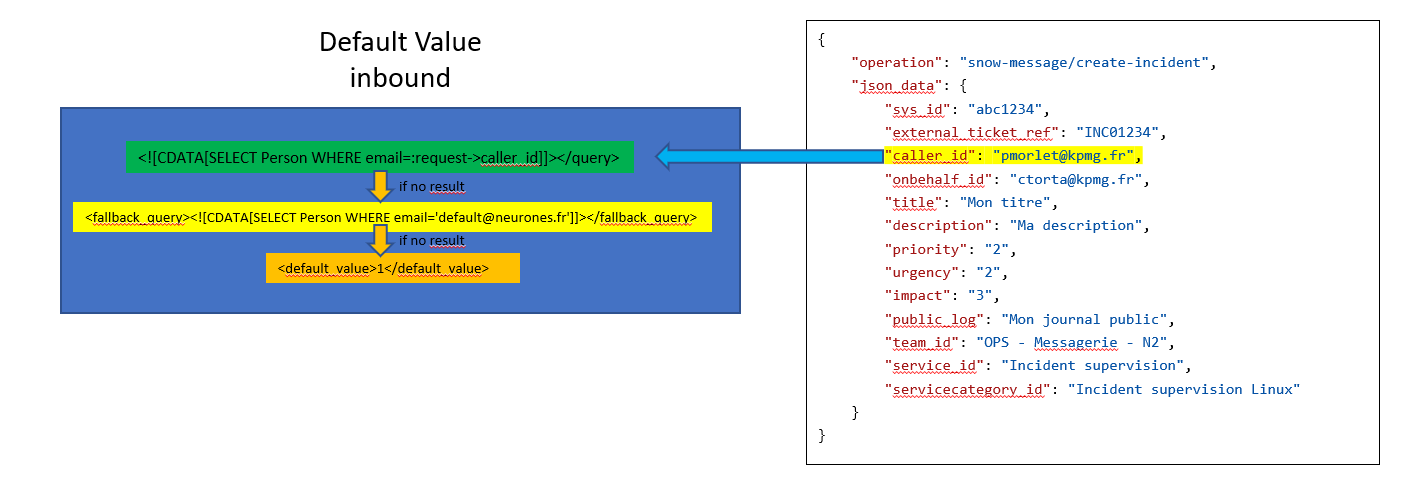
Example with default value in inbound for an external key
<attribute id="caller_id" xsi:type="Combodo\iTop\Extension\CEXSDK\Mapping\ByOQL">
        <query><![CDATA[SELECT Person WHERE email=:remote->caller_id]]></query>
        <fallback_query><![CDATA[SELECT Person WHERE email='default@combodo.com']]></fallback_query>
</attribute>
If the OQL query (query and fallback_query) does not return any object, the processing considers that the attribute is NOT UPDATED and doesn't return an error (unless the attribute is mandatory and has not yet a value).
You cannot use the parameter <default_value>NULL</default_value>.
However, if the corresponding remote field (caller_id in the previous example) is set to RESET_TO_NULL by the remote, then an external key can be erased locally.
Example with default value in inbound for a simple attribute
<attribute id="beneficiary_name" xsi:type="Combodo\iTop\Extension\CEXSDK\Mapping\ByOQL">
        <query><![CDATA[SELECT Person WHERE email=:remote->caller_id]]></query>
        <fallback_query><![CDATA[SELECT Person WHERE email='default@combodo.com']]></fallback_query>
        <attribute_code id="name"/>
        <default_value>No name found</default_value>
</attribute>
Field Mappings
This is the reference for the mapping of outgoing message fields using local attributes.
| Tag | Usage | Description |
|---|---|---|
| <field id="name" xsi:type="Combodo\iTop\Extension\CEXSDK\Mapping\ByObjectAttribute">title</field> | zero or more | Field mapping (remote field) with the local attribute using the name |
| <field id="name" xsi:type="Combodo\iTop\Extension\CEXSDK\Mapping\ByModifiedObjectAttributes"> | zero or more | Template mapping with modified local attributes. See Mapping by Modified Attributes |
| <modified_attributes> | mandatory | List of modified attribtes to map |
| <modified_attribute id="name">Changement d'état vers $this->status$</modified_attribute> | at least one | Template for modified attribute |
| <field id="name" xsi:type="Combodo\iTop\Extension\CEXSDK\Mapping\ByOQL"> | zero or more | Mapping the remote field using an OQL query. See Mapping by OQL |
| <query>SELECT FunctionalCI WHERE id=:object->supervisionci_id</query> | mandatory | OQL query used |
| <fallback_query>SELECT FunctionalCI WHERE name='CI non référencé'</fallback_query> | optional | backup OQL query if the first return no result |
| <attribute_code id="name"> | optional | defaults to 'id' |
| <default_value>test CI</default_value> | optional | default value if the attribute value return by OQL query is NULL |
| <field id="name" xsi:type="Combodo\iTop\Extension\CEXSDK\Mapping\ByMatrix"> | zero or more | Mapping field using a matrix |
| <attribute_code id="name"> | mandatory | name of the local attribute |
| <values> | mandatory | A list of value of the local attribute and corresponding value to send to the remote field |
| <value id="name">1</value> | at least one | value of the local attribute and corresponding value to send to the remote field |
| <default_value>default</default_value> | optional | A default value if no entry found in the matrix |
| <field id="name" xsi:type="Combodo\iTop\Extension\CEXSDK\Mapping\ByConstant">Autre</field> | zero or more | Field mapping using a constant |
| <field id="name" xsi:type="Combodo\iTop\Extension\CEXSDK\Mapping\ByTemplate"> | zero or more | Like the body of a notification, you can format and combine multiple attributes from the source object into the template. See Mapping by Template |
| <template id="description">Change of description: $this->description$</template> | mandatory | Template to send. It uses the same logic as Notification body. Multiple source attributes can be combined. The template is send regardless of the fact that the attributes are modified or not. The id must be a valid attribute code, it is used to determine the message field format. |
| <field id="name" xsi:type="Combodo\iTop\Extension\CEXSDK\Mapping\GlobalMapping"> | zero or more | Field mapping using the global mapping |
Mapping by modified attributes
See Message contents and placeholders for templates syntax.
First example: sending the last entry of a caselog, in HTML format, but only if it was modified:
<field id="public_log" xsi:type="Combodo\iTop\Extension\CEXSDK\Mapping\ByModifiedObjectAttributes">
        <modified_attributes>
                <modified_attribute id="public_log">$this->head_html(public_log)$</modified_attribute>
        </modified_attributes>
</field>
Second example: Sending in a log, in HTML format, the combination of two fields, each of them is present only if it was modified
<field id="private_log" xsi:type="Combodo\iTop\Extension\CEXSDK\Mapping\ByModifiedObjectAttributes"> <modified_attributes> <modified_attribute id="private_log">$this->head_html(private_log)$</modified_attribute> <modified_attribute id="solution">$this->solution$</modified_attribute> </modified_attributes> </field>
Mapping by OQL
The allowed query parameters for the mapping by OQL are:
-
object the object currently synchronized
-
current_user
-
current_contact
Default Value
To avoid mapping errors, it's possible to define default values for inbound and outbound.
Exemple with default value in outbound
<field id="u_beneficiaire" xsi:type="Combodo\iTop\Extension\CEXSDK\Mapping\ByOQL">
        <query><![CDATA[SELECT Person WHERE id=:object->onbehalf_id]]></query>
        <attribute_code id="email"/>
        <default_value>NULL</default_value>
</field>
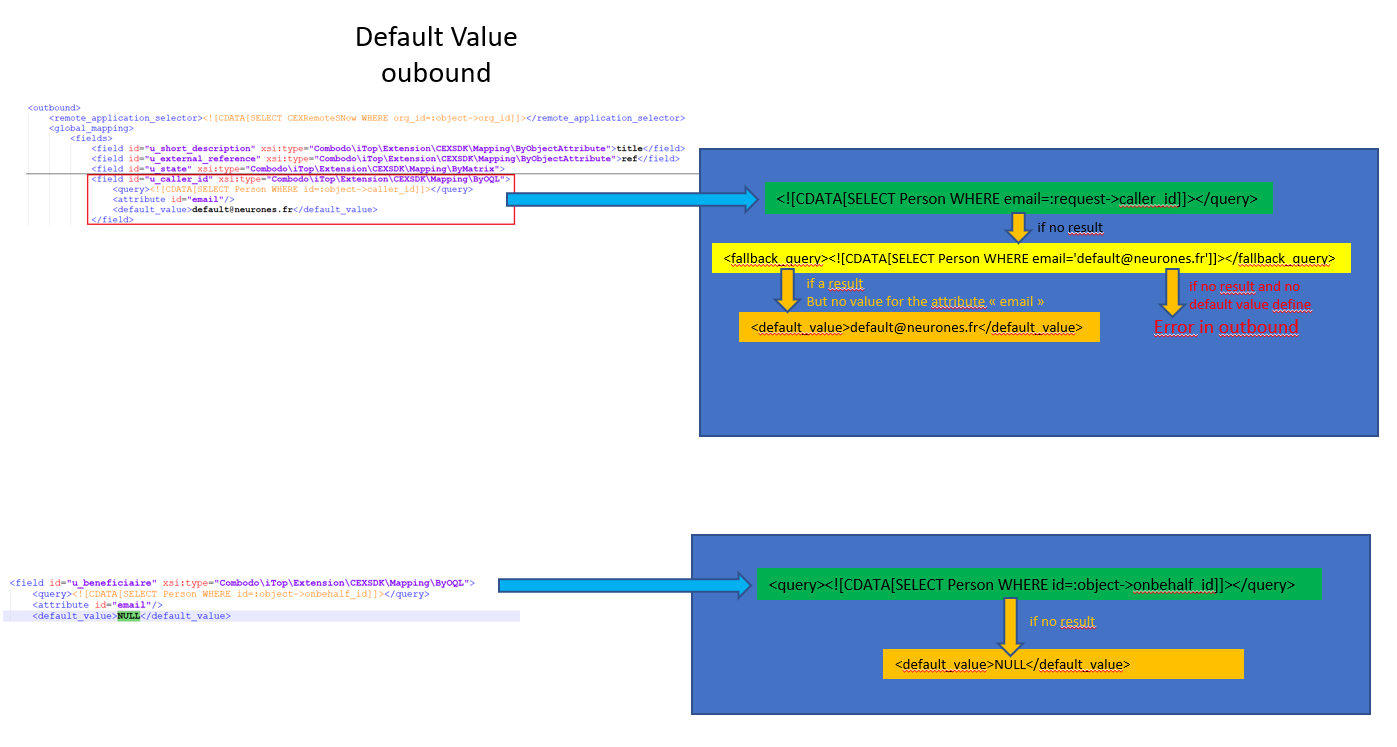
If the OQL query (query and fallback_query) does not return any object, a default value “NuLL” (not “NULL”) will be send to avoid an error.
Mapping by Template
This mapping only works for outbound message. It allows:
-
to transform an html attribute into a pur text, eg.
$this→text(description)$or$this→head(public_log)$ -
to send information even if the attribute was not modified during the event which triggered the outbound scenario
-
to combine multiple attributes as well as free text into a single field
-
New line and html tags are allowed within the template
-
It uses the same logic as Notification body.
Example #1
-
Feeding a message field
resolution -
Template id being a User Request attribute
solutionof type Text, the field message will be formatted as a multi-lines text -
Template value is a combination of free text and 2 others fields:
resolution_codeandpublic_log -
solution,resolution_codeandpublic_logdo not have to be modified recently, for the message field to be sent -
The field used for the format does not have to be part of the template.
-
Note the use of $this→text(public_log)$ to force the log to be in text format without html tags.
<field id="resolution" xsi:type="Combodo\iTop\Extension\CEXSDK\Mapping\ByTemplate">
      <template id="solution" _delta="redefine"><![CDATA[Resolution code: $this->label(resolution_code)$ ($this->resolution_code$)
Last log entry: $this->text(public_log)$]]></template>
</field>
Example #2
-
Feeding an html field with the last entry of two logs
-
Template id being a User Request attribute
descriptionof type HTML, the field message will be formatted as an HTML -
Template value uses now html tags for generating multi-lines entry
<field id="description" xsi:type="Combodo\iTop\Extension\CEXSDK\Mapping\ByTemplate">
     <template id="description"><![CDATA[<h3>Private:</h3>$this->head_html(private_log)$<br><h3>Public:</h3><p>$this->head_html(public_log)</p>]]></template>
</field>
Example #3
<field id="private_log" xsi:type="Combodo\iTop\Extension\CEXSDK\Mapping\ByTemplate"> <template id="private_log"><![CDATA[Information related to the requestor: <br/> <li> Requestor: $this->caller_id_friendlyname$</li> <li> Organization: $this->org_name$</li> <li> Rank: $this->caller_rank$</li> <li> Location: $this->location_friendlyname$</li> <li> Mail: $this->caller_id->email$</li> <li> Phone: $this->caller_phone$</li> <li> Mobil phone: $this->caller_id->mobile_phone$</li> <br/><br/>Agent private caselog: $this->html(private_log)$]]> </template> </field>
Module design reference
| Tag | Usage | Description |
|---|---|---|
| <module_design id="case-exchange" xsi:type="case-exchange"> | mandatory | Container node for a set of design data. The identifier must be unique and match the name of the module case-exchange, but any string is allowed provided that it does not contain slashes or backslashes |
| <remote_applications> | mandatory | Container node for a set of remote applications that use the case-exchange |
| <remote_application id="UUID" xsi:type="Remote Application class"> | at least one | Definition ot a remote application. The name must be the same as the one declared in the menu Configuration > Case Exchange > Remote applications : attribute "UUID" |
| <global> | mandatory | Container node for a set of global parameters with this remote application |
| <inbound> | mandatory | Container node for a set global parameters in inbound (remote-app to itop) |
| <operations> | mandatory | Container node for a set of global operations |
| <operation id="name" xsi:type="Combodo\iTop\Extension\CEXSNow\Service\CEXIncomingMessageHandShake"> | mandatory | An operation not linked to a specific class |
| <synchronized_classes> | mandatory | Container node for a set of itop classes to synchronize in the case-exchange |
| <synchronized_class id="name"> | at least one | An itop class to synchronize in the case-exchange |
| <depends_on> | optional | Depends on other object (use the same message queue) |
| <query>SELECT UserRequest WHERE id=:object->userrequest_id</query> | mandatory | OQL query to find the parent object (object is the current synchronized object) |
| <inbound> | optional | Container node for a set of parameters in inbound (remote-app to iTop) |
| <global_mapping> | optional | Container node for a set of global mapping |
| <object_attributes> | mandatory | Container node for the mapping of a set of attributes of the synchronized object |
| <attribute> | at least one | Declaration of an attribute. See the various types of attributes in section Attributes |
| <link_attributes> | mandatory | Container node for the mapping of a set of attributes of the local to remote link |
| <attribute> | at least one | Declaration of an attribute. See the various types of attributes in section Attributes |
| <remote_fields> | mandatory | Container node for the mapping of a set of fields to send to the remote |
| <field> | at least one | Declaration of a remote field. See the various types of field mapping in section Fields |
| <error_response> | optional | Container node for the error response fields |
| <remote_fields> | mandatory | A list of fields to return |
| <field> | at least one | Field definition to return. See the various types of field mapping in section Fields |
| <operations> | optional | Container node for a set of operations |
| <operation id="name" xsi:type="Combodo\iTop\Extension\CEXSDK\Incoming\Message\CreateOrUpdateObject"> | zero or more | An operation that can be call by the remote application. The identifier must be unique. |
| <message_operation>create</message_operation> | mandatory | Operation type : create or update |
| <stimulus>ev_assign_team</stimulus> | optional | Stimulus run after the operation |
| <request> | mandatory | |
| <object_attributes> | mandatory | A set of expected attributes of the synchronized object |
| <attribute> | at least one | Declaration of an attribute. See the various types of attributes in section Attributes |
| <link_attributes> | mandatory | A set of expected attributes of the local to remote link |
| <attribute> | at least one | Declaration of an attribute. See the various types of attributes in section Attributes |
| <response> | optional | Answer returned to the remote application after the call |
| <remote_fields> | mandatory | A list of fields to return to the remote |
| <field> | at least one | Field definition to return. See the various types of field mapping in section Fields |
| <outbound> | mandatory | Container node for a set of parameters in outbound (iTop to the remote-app) |
| <remote_application_selector xsi:type="Combodo\iTop\Extension\CEXSDK\Outgoing\RemoteApplicationSelector\SelectorByOQL">SELECT CEXRemoteSNow WHERE org_id=:object->org_id</remote_application_selector> | mandatory | Condition to trigger the case-exchange in outbound with the correct remote-application |
| <global_mapping> | optional | Container node for a set of global mapping |
| <object_attributes> | mandatory | Container node for the mapping of a set of attributes of the synchronized object |
| <attribute> | at least one | Declaration of an attribute. See the various types of attributes in section Attributes |
| <link_attributes> | mandatory | Container node for the mapping of a set of attributes of the local to remote link |
| <attribute> | at least one | Declaration of an attribute. See the various types of attributes in section Attributes |
| <remote_fields> | mandatory | Container node for the mapping of a set of fields to send to the remote |
| <field> | at least one | Declaration of a remote field. See the various types of field mapping in section Fields |
| <attachment> | optional | Container node to manage attachment configuration |
| <add_attachment_message xsi:type="CEXSDKHTTPMessageAddAttachment"> | mandatory | Name of the operation to add an attachement on the remote app |
| <http_headers> | mandatory | A set of header configuration |
| <http_header>Content-Type:multipart/form-data</http_header> | mandatory | Headrer format for the attachment |
| <http_url>/api/now/attachment/upload</http_url> | mandatory | URL to call to add an attachment to the remote-app |
| <scenario_operations> | optional | Container node for a set of scenario |
| <scenario_operation id="name" xsi:type="Combodo\iTop\Extension\CEXSDK\Outgoing\Scenario\Operation\Create"> | zero or more | A scenario that can be execute to the remote application. The identifier must be unique. |
| <condition xsi:type="Combodo\iTop\Extension\CEXSDK\Outgoing\Scenario\Condition\Create"> | optional | Condition to run the scenario : create |
| <message xsi:type="CEXSDKHTTPMessageCreateOrUpdateObject"> | mandatory | Message type to use |
| <http_url>/api/now/table/u_itop_incident</http_url> | mandatory | URL to call to the remote app |
| <http_headers> | mandatory | A set of header configuration |
| <http_header>Content-Type: application/json</http_header> | mandatory | Header type |
| <request> | mandatory | Request configuration |
| <remote_fields> | mandatory | A set of fields to send to the remote |
| <field> | at least one | Declaration of a request field. See the various types of field mapping in section Fields |
| <response> | mandatory | Response configuration |
| <object_attributes> | mandatory | A set of attributes of the synchronized object to process from the remote response |
| <attribute id="name" xsi:type="Combodo\iTop\Extension\CEXSDK\Mapping\ByRequestField">u_incident_ref_number</attribute> | mandatory | Declaration of the local attribute and the remote attribute processed |
| <link_attributes> | mandatory | A set of attributes of the local to remote link to process from the remote response |
| <attribute id="name" xsi:type="Combodo\iTop\Extension\CEXSDK\Mapping\ByRequestField">u_incident_ref_number</attribute> | mandatory | Declaration of the local attribute and the remote attribute processed |
| <status> | optional | Response status checking |
| <error_field>sys_import_state</error_field> | mandatory | Response field containing the error code |
| <ok_values> | mandatory | List of acceptable error codes |
| <ok_value>inserted</ok_value> | at least one | OK Value to check with |
| <error_message_field>sys_import_state_comment</error_message_field> | mandatory | Response field containing the error message |
| <handover>false</handover> | mandatory | Concept of master (false) or slave (true) on the local |
| <scenario_operation id="name" xsi:type="Combodo\iTop\Extension\CEXSDK\Outgoing\Scenario\Operation\EnteringState"> | zero or more | A scenario that can be execute to the remote application. The identifier must be unique. |
| <condition xsi:type="Combodo\iTop\Extension\CEXSDK\Outgoing\Scenario\Condition\EnteringState"> | mandatory | Condition to run the scenario : entering state |
| <entering_states> | mandatory | A set of entering state |
| <entering_state id="name"> | zero or more | Name of the entering state (life cycle attribute on the iTop class) |
| <previous_states> | mandatory | A set of previous states |
| <previous_state>new</previous_state> | mandatory | Name of the previous state |
| <message xsi:type="CEXSDKHTTPMessageCreateOrUpdateObject"> | mandatory | Message type to use |
| <http_url>/api/now/table/u_itop_incident</http_url> | mandatory | URL to call to the remote app |
| <http_headers> | mandatory | A set of header configuration |
| <http_header>Content-Type: application/json</http_header> | mandatory | Header type |
| <request> | mandatory | Request configuration |
| <remote_fields> | mandatory | A set of fields to send to the remote |
| <field> | at least one | Declaration of a request field. See the various types of field mapping in section Fields |
| <response> | mandatory | Response configuration |
| <object_attributes> | mandatory | A set of attributes of the synchronized object to process from the remote response |
| <attribute id="name" xsi:type="Combodo\iTop\Extension\CEXSDK\Mapping\ByRequestField">u_incident_ref_number</attribute> | mandatory | Declaration of the local attribute and the remote attribute processed |
| <link_attributes> | mandatory | A set of attributes of the local to remote link to process from the remote response |
| <attribute id="name" xsi:type="Combodo\iTop\Extension\CEXSDK\Mapping\ByRequestField">u_incident_ref_number</attribute> | mandatory | Declaration of the local attribute and the remote attribute processed |
| <status> | optional | Response status checking |
| <error_field>sys_import_state</error_field> | mandatory | Response field containing the error code |
| <ok_values> | mandatory | List of acceptable error codes |
| <ok_value>inserted</ok_value> | at least one | OK Value to check with |
| <error_message_field>sys_import_state_comment</error_message_field> | mandatory | Response field containing the error message |
| <handover>false</handover> | mandatory | Concept of master (false) or slave (true) on the local |
| <scenario_operation id="name" xsi:type="Combodo\iTop\Extension\CEXSDK\Outgoing\Scenario\Operation\Update"> | mandatory | A scenario that can be execute to the remote application. The identifier must be unique. |
| <condition xsi:type="Combodo\iTop\Extension\CEXSDK\Outgoing\Scenario\Condition\ModifiedAttributes"> | mandatory | Condition to run the scenario : update on some attributes |
| <modified_attributes> | mandatory | A set of attributes to be considered |
| <modified_attribute id="name"> | zero or more | Name of the attribute |
| <message xsi:type="CEXSDKHTTPMessageCreateOrUpdateObject"> | mandatory | Message type to use |
| <http_url>/api/now/table/u_itop_incident</http_url> | mandatory | URL to call to the remote app |
| <http_headers> | mandatory | A set of header configuration |
| <http_header>Content-Type: application/json</http_header> | mandatory | Header type |
| <request> | mandatory | Request configuration |
| <remote_fields> | mandatory | A set of fields to send to the remote |
| <field> | at least one | Declaration of a request field. See the various types of field mapping in section Fields |
| <response> | mandatory | Response configuration |
| <object_attributes> | mandatory | A set of attributes of the synchronized object to process from the remote response |
| <attribute id="name" xsi:type="Combodo\iTop\Extension\CEXSDK\Mapping\ByRequestField">u_incident_ref_number</attribute> | mandatory | Declaration of the local attribute and the remote attribute processed |
| <link_attributes> | mandatory | A set of attributes of the local to remote link to process from the remote response |
| <attribute id="name" xsi:type="Combodo\iTop\Extension\CEXSDK\Mapping\ByRequestField">u_incident_ref_number</attribute> | mandatory | Declaration of the local attribute and the remote attribute processed |
| <status> | optional | Response status checking |
| <error_field>sys_import_state</error_field> | mandatory | Response field containing the error code |
| <ok_values> | mandatory | List of acceptable error codes |
| <ok_value>inserted</ok_value> | at least one | OK Value to check with |
| <error_message_field>sys_import_state_comment</error_message_field> | mandatory | Response field containing the error message |
| <handover>false</handover> | mandatory | Concept of master (false) or slave (true) on the local |
Generated events
Events are generated when sending and receiving messages.
Incoming message Event
After an incoming message is processed. This event is sent on the remote application.
Event Data
-
'object' The remote application used by this message (CEXRemoteApplication)
-
'operation' Received operation name (string)
-
'synchronized_object' The synchronized object (DBObject)
-
'message' Received message (Combodo\iTop\Extension\CEXSDK\Incoming\Message\CEXIncomingMessage)
-
'response' The response data sent to the remote (array)
-
'debug_info' Debug string (string)
Event Sources
-
CEXRemoteApplication
Event
-
EVENT_CEX_AFTER_INCOMING_MESSAGE
Outgoing message Event
After an outgoing scenario response is processed. This event is sent on the remote application.
Event Data
-
'object' The remote application used by this message (CEXRemoteApplication)
-
'synchronized_object' The synchronized object (DBObject)
-
'message' The message used to communicate with the remote (CEXSendMessageTask)
-
'response' The response received from the remote (array)
-
'debug_info' Debug string (string)
Event Sources
-
CEXRemoteApplication
Event
-
EVENT_CEX_AFTER_OUTGOING_MESSAGE
Q & A
Troubleshooting
Q: On my Remote Application, when it tries to connect I
receive an error message:
Failed to establish the connection: The rest service replied with a wrong format: '<!DOCTYPE html> <html lang="en"> <head> <meta charset="utf-8">
A: Check the url to the remote application.
If it's an iTop, you're getting the login page instead of the
rest.php service, this happen for eg if your iTop url ends with
/pages/UI.php, it should not, remove all that
part.
Q: My mapping by OQL does not work also I am sure the
query tag is correct?
A: Be sure that also the
fallback_query is correct, because the CEX ckecks
always booth queries, regardless if the fallback
is not needed.
If your queries uses placeholders such as
:remote→field_name and the
remote_field is not present in the received message,
then the mapping will fail.
Purge CEX data
If you want to purge Case Exchange data there are several tables to clean up. Some actions can be done directly in iTop because volumes are not too high. Some may require sql delete commands
CEXLocalToRemoteObject
This object contains all relationships between the local object (a ticket for instance) and the remote related one. This object is used to identify if an object i link to a remote one. It is used to dispay the “chain” icon when you display the detail of an object.
The following SQL command display the count of relationships by remote application
SELECT remoteapplication_id,COUNT(*) FROM cex_localtoremoteobject GROUP BY remoteapplication_id
To purge those data you can make it either in iTop by searching CEXLocalToRemoteObject and delete them or using the following SQL commande:
DELETE FROM cex_localtoremoteobject WHERE remoteapplication_id = x;
CEXSendMessageTask
The object CEXSendMessageTask contains case exchange operation order sent to the remote application. Informations are store in the MySQL database in the following tables
-
priv_async_task
-
priv_async_queue
-
cex_message
-
from cex_message_add_att
-
cex_message_del_att
-
from cex_message_object
If you want to purge those message you can use the following sql command and ajust them using date criteria (created,planned,started) on the table priv_async_task for instance It is important to know that those message are removed once they had been managed successfully
DELETE t.* FROM priv_async_task AS t
JOIN priv_async_queue AS q ON t.id=q.id
JOIN cex_message AS m ON q.id =m.id;

DELETE q.* FROM priv_async_queue AS q
JOIN cex_message AS m ON q.id =m.id;

DELETE FROM cex_message ;
DELETE FROM cex_message_add_att;
DELETE FROM cex_message_del_att;
DELETE FROM cex_message_object;
CEXRemoteApplication
The CEXRemoteApplication describes the external application with which your iTop exchange data. Information are stored in the following tables
-
cex_remoteapplication
-
cex_remoteitopfile
-
cex_remoteitophttp
-
cex_central_satellite_itophttp
It is recommanded to delete them in iTop Console
CEXEvent
This object contains all the case exchange sent and receive between your iTop and the remote applications. By default there is no automated task that purge them.
Data are stored in the following MySQL tables:
-
priv_event
-
priv_event_cex
If you want to purge those data you can use the following SQL command
DELETE e.* FROM priv_event AS e JOIN priv_event_cex AS cex ON e.id = cex.id;
DELETE FROM priv_event_cex;
You can use the “date” attribute on the table priv_event to limit the element to suppress
CEX Trigger
There is one trigger that can be configured for managing case exchange errors : Trigger (on case exchange error) It is recommended to suppress them in the iTop console
Exemple
<module_design id="case-exchange" _delta="must_exist"> <remote_applications> <remote_application id="DefaultCEXRemoteiTop" xsi:type="CEXRemoteiTop" _delta="define"> <global> <inbound> <operations> <operation id="itop-message/hand-shake" xsi:type="Combodo\iTop\Extension\CEXiTop\Service\CEXIncomingMessageHandShake"/> <operation id="itop-message/add-attachment" xsi:type="Combodo\iTop\Extension\CEXSDK\Incoming\Message\AddAttachment"/> <operation id="itop-message/del-attachment" xsi:type="Combodo\iTop\Extension\CEXSDK\Incoming\Message\DelAttachment"/> </operations> </inbound> </global> <synchronized_classes> <synchronized_class id="UserRequest"> <inbound> <global_mapping> <object_attributes> <!-- How the local synchronized object attributes are mapped from the received message fields --> <attribute id="agent_id" xsi:type="Combodo\iTop\Extension\CEXSDK\Mapping\ByOQL"> <query><![CDATA[SELECT Person WHERE email=:remote->agent_id AND email != '']]></query> <args> <arg id="remote->agent_id"> <remote_field id="agent_id"/> <description>Agent email</description> </arg> </args> </attribute> <attribute id="caller_id" xsi:type="Combodo\iTop\Extension\CEXSDK\Mapping\ByOQL"> <query><![CDATA[SELECT Person WHERE email=:remote->caller_id AND email != '']]></query> <fallback_query><![CDATA[SELECT Person WHERE email='claude.monet@demo.com']]></fallback_query> <args> <arg id="remote->caller_id"> <remote_field id="caller_id"/> <description>Caller email</description> </arg> </args> </attribute> <attribute id="description" xsi:type="Combodo\iTop\Extension\CEXSDK\Mapping\ByRemoteField">description</attribute> <attribute id="escalation_flag" xsi:type="Combodo\iTop\Extension\CEXSDK\Mapping\ByRemoteField">escalation_flag</attribute> <attribute id="escalation_reason" xsi:type="Combodo\iTop\Extension\CEXSDK\Mapping\ByRemoteField">escalation_reason</attribute> <attribute id="impact" xsi:type="Combodo\iTop\Extension\CEXSDK\Mapping\ByMatrix"> <remote_field id="impact"/> <description>Impact value: 1, 2 or 3</description> <values> <value id="1">3</value> <value id="2">2</value> <value id="3">1</value> </values> </attribute> <attribute id="org_id" xsi:type="Combodo\iTop\Extension\CEXSDK\Mapping\ByOQL"> <query><![CDATA[SELECT Organization WHERE name=:remote->org_id]]></query> <args> <arg id="remote->org_id"> <remote_field id="org_id"/> <description>Organization name</description> </arg> </args> </attribute> <attribute id="origin" xsi:type="Combodo\iTop\Extension\CEXSDK\Mapping\ByRemoteField"> <remote_field id="origin"/> <description>call origin (phone,...)</description> </attribute> <attribute id="parent_request_id" xsi:type="Combodo\iTop\Extension\CEXSDK\Mapping\ByOQL"> <query><![CDATA[SELECT UserRequest WHERE remote_ref=:remote->parent_request_id AND remote_ref != '']]></query> <args> <arg id="remote->parent_request_id"> <remote_field id="parent_request_id"/> <description>Parent ticket reference</description> </arg> </args> </attribute> <attribute id="pending_reason" xsi:type="Combodo\iTop\Extension\CEXSDK\Mapping\ByRemoteField">pending_reason</attribute> <attribute id="private_log" xsi:type="Combodo\iTop\Extension\CEXSDK\Mapping\ByRemoteField">private_log</attribute> <attribute id="public_log" xsi:type="Combodo\iTop\Extension\CEXSDK\Mapping\ByRemoteField">public_log</attribute> <attribute id="remote_ref" xsi:type="Combodo\iTop\Extension\CEXSDK\Mapping\ByRemoteField">ref</attribute> <attribute id="request_type" xsi:type="Combodo\iTop\Extension\CEXSDK\Mapping\ByRemoteField">request_type</attribute> <attribute id="resolution_code" xsi:type="Combodo\iTop\Extension\CEXSDK\Mapping\ByRemoteField">resolution_code</attribute> <attribute id="service_id" xsi:type="Combodo\iTop\Extension\CEXSDK\Mapping\ByOQL"> <query><![CDATA[SELECT Service WHERE name=:remote->service_id]]></query> <args> <arg id="remote->service_id"> <remote_field id="service_id"/> <description>Service name</description> </arg> </args> </attribute> <attribute id="servicesubcategory_id" xsi:type="Combodo\iTop\Extension\CEXSDK\Mapping\ByOQL"> <query><![CDATA[SELECT ServiceSubcategory WHERE name=:remote->servicesubcategory_id]]></query> <args> <arg id="remote->servicesubcategory_id"> <remote_field id="servicesubcategory_id"/> <description>Service sub-category name</description> </arg> </args> </attribute> <attribute id="solution" xsi:type="Combodo\iTop\Extension\CEXSDK\Mapping\ByRemoteField">solution</attribute> <attribute id="team_id" xsi:type="Combodo\iTop\Extension\CEXSDK\Mapping\ByOQL"> <query><![CDATA[SELECT Team WHERE name=:remote->team_id]]></query> <args> <arg id="remote->team_id"> <remote_field id="team_id"/> <description>Team name</description> </arg> </args> </attribute> <attribute id="title" xsi:type="Combodo\iTop\Extension\CEXSDK\Mapping\ByRemoteField">title</attribute> <attribute id="urgency" xsi:type="Combodo\iTop\Extension\CEXSDK\Mapping\ByMatrix"> <remote_field id="urgency"/> <description>Urgency level: 1 to 4</description> <values> <value id="1">1</value> <value id="2">2</value> <value id="3">3</value> <value id="4">4</value> </values> </attribute> <attribute id="user_satisfaction" xsi:type="Combodo\iTop\Extension\CEXSDK\Mapping\ByRemoteField">user_satisfaction</attribute> <attribute id="user_comment" xsi:type="Combodo\iTop\Extension\CEXSDK\Mapping\ByRemoteField">user_comment</attribute> </object_attributes> <link_attributes> <!-- How the local to remote link attributes are mapped from the received message fields --> <attribute id="source_key" xsi:type="Combodo\iTop\Extension\CEXSDK\Mapping\ByRemoteField">source_key</attribute> <attribute id="source_fname" xsi:type="Combodo\iTop\Extension\CEXSDK\Mapping\ByRemoteField">source_fname</attribute> <attribute id="source_class" xsi:type="Combodo\iTop\Extension\CEXSDK\Mapping\ByConstant">UserRequest</attribute> </link_attributes> <remote_fields> <!-- How the fields for the response to the remote system are mapped from the local synchronized object --> <field id="agent_id" xsi:type="Combodo\iTop\Extension\CEXSDK\Mapping\ByOQL"> <query><![CDATA[SELECT Person WHERE id=:object->agent_id]]></query> <attribute_code id="email"/> <default_value>NULL</default_value> </field> <field id="caller_id" xsi:type="Combodo\iTop\Extension\CEXSDK\Mapping\ByOQL"> <query><![CDATA[SELECT Person WHERE id=:object->caller_id]]></query> <attribute_code id="email"/> <default_value>NULL</default_value> </field> <field id="description" xsi:type="Combodo\iTop\Extension\CEXSDK\Mapping\ByObjectAttribute">description</field> <field id="escalation_flag" xsi:type="Combodo\iTop\Extension\CEXSDK\Mapping\ByObjectAttribute">escalation_flag</field> <field id="escalation_reason" xsi:type="Combodo\iTop\Extension\CEXSDK\Mapping\ByObjectAttribute">escalation_reason</field> <field id="impact" xsi:type="Combodo\iTop\Extension\CEXSDK\Mapping\ByObjectAttribute">impact</field> <field id="org_id" xsi:type="Combodo\iTop\Extension\CEXSDK\Mapping\ByObjectAttribute">org_id_friendlyname</field> <field id="origin" xsi:type="Combodo\iTop\Extension\CEXSDK\Mapping\ByConstant">remote_itop</field> <field id="parent_request_id" xsi:type="Combodo\iTop\Extension\CEXSDK\Mapping\ByObjectAttribute">parent_request_ref</field> <field id="pending_reason" xsi:type="Combodo\iTop\Extension\CEXSDK\Mapping\ByObjectAttribute">pending_reason</field> <field id="public_log" xsi:type="Combodo\iTop\Extension\CEXSDK\Mapping\ByModifiedObjectAttributes"> <modified_attributes> <modified_attribute id="public_log">$this->head_html(public_log)$</modified_attribute> </modified_attributes> </field> <field id="ref" xsi:type="Combodo\iTop\Extension\CEXSDK\Mapping\ByObjectAttribute">ref</field> <field id="request_type" xsi:type="Combodo\iTop\Extension\CEXSDK\Mapping\ByObjectAttribute">request_type</field> <field id="resolution_code" xsi:type="Combodo\iTop\Extension\CEXSDK\Mapping\ByObjectAttribute">resolution_code</field> <field id="service_id" xsi:type="Combodo\iTop\Extension\CEXSDK\Mapping\ByObjectAttribute">service_id_friendlyname</field> <field id="servicesubcategory_id" xsi:type="Combodo\iTop\Extension\CEXSDK\Mapping\ByObjectAttribute">servicesubcategory_id_friendlyname</field> <field id="solution" xsi:type="Combodo\iTop\Extension\CEXSDK\Mapping\ByObjectAttribute">solution</field> <field id="team_id" xsi:type="Combodo\iTop\Extension\CEXSDK\Mapping\ByObjectAttribute">team_id_friendlyname</field> <field id="title" xsi:type="Combodo\iTop\Extension\CEXSDK\Mapping\ByObjectAttribute">title</field> <field id="urgency" xsi:type="Combodo\iTop\Extension\CEXSDK\Mapping\ByObjectAttribute">urgency</field> <field id="user_satisfaction" xsi:type="Combodo\iTop\Extension\CEXSDK\Mapping\ByObjectAttribute">user_satisfaction</field> <field id="user_comment" xsi:type="Combodo\iTop\Extension\CEXSDK\Mapping\ByObjectAttribute">user_comment</field> </remote_fields> </global_mapping> <error_response> <remote_fields> <field id="ref" xsi:type="Combodo\iTop\Extension\CEXSDK\Mapping\ByObjectAttribute">ref</field> </remote_fields> </error_response> <operations> <operation id="itop-message/create-userrequest" xsi:type="Combodo\iTop\Extension\CEXSDK\Incoming\Message\CreateOrUpdateObject"> <message_operation>create</message_operation> <request> <link_attributes> <attribute id="source_key" xsi:type="Combodo\iTop\Extension\CEXSDK\Mapping\GlobalMapping"/> <attribute id="source_fname" xsi:type="Combodo\iTop\Extension\CEXSDK\Mapping\GlobalMapping"/> <attribute id="source_class" xsi:type="Combodo\iTop\Extension\CEXSDK\Mapping\GlobalMapping"/> </link_attributes> <object_attributes> <attribute id="org_id" xsi:type="Combodo\iTop\Extension\CEXSDK\Mapping\GlobalMapping"/> <attribute id="caller_id" xsi:type="Combodo\iTop\Extension\CEXSDK\Mapping\GlobalMapping"/> <attribute id="origin" xsi:type="Combodo\iTop\Extension\CEXSDK\Mapping\GlobalMapping"/> <attribute id="title" xsi:type="Combodo\iTop\Extension\CEXSDK\Mapping\GlobalMapping"/> <attribute id="description" xsi:type="Combodo\iTop\Extension\CEXSDK\Mapping\GlobalMapping"/> <attribute id="service_id" xsi:type="Combodo\iTop\Extension\CEXSDK\Mapping\GlobalMapping"/> <attribute id="servicesubcategory_id" xsi:type="Combodo\iTop\Extension\CEXSDK\Mapping\GlobalMapping"/> <attribute id="request_type" xsi:type="Combodo\iTop\Extension\CEXSDK\Mapping\GlobalMapping"/> <attribute id="impact" xsi:type="Combodo\iTop\Extension\CEXSDK\Mapping\GlobalMapping"/> <attribute id="urgency" xsi:type="Combodo\iTop\Extension\CEXSDK\Mapping\GlobalMapping"/> <attribute id="parent_request_id" xsi:type="Combodo\iTop\Extension\CEXSDK\Mapping\GlobalMapping"/> <attribute id="remote_ref" xsi:type="Combodo\iTop\Extension\CEXSDK\Mapping\GlobalMapping"/> <attribute id="public_log" xsi:type="Combodo\iTop\Extension\CEXSDK\Mapping\GlobalMapping"/> </object_attributes> </request> <response> <remote_fields> <field id="ref" xsi:type="Combodo\iTop\Extension\CEXSDK\Mapping\GlobalMapping"/> <field id="target_key" xsi:type="Combodo\iTop\Extension\CEXSDK\Mapping\ByObjectAttribute">id</field> <field id="target_fname" xsi:type="Combodo\iTop\Extension\CEXSDK\Mapping\ByObjectAttribute">ref</field> <field id="target_class" xsi:type="Combodo\iTop\Extension\CEXSDK\Mapping\ByConstant">UserRequest</field> </remote_fields> </response> </operation> <operation id="itop-message/update-userrequest" xsi:type="Combodo\iTop\Extension\CEXSDK\Incoming\Message\CreateOrUpdateObject"> <message_operation>update</message_operation> <request> <link_attributes> <attribute id="source_fname" xsi:type="Combodo\iTop\Extension\CEXSDK\Mapping\GlobalMapping"/> </link_attributes> <object_attributes> <attribute id="public_log" xsi:type="Combodo\iTop\Extension\CEXSDK\Mapping\GlobalMapping"/> </object_attributes> </request> <response> <remote_fields> <field id="caller_id" xsi:type="Combodo\iTop\Extension\CEXSDK\Mapping\ByObjectAttribute">caller_id_friendlyname</field> <field id="description" xsi:type="Combodo\iTop\Extension\CEXSDK\Mapping\ByObjectAttribute">description</field> <field id="impact" xsi:type="Combodo\iTop\Extension\CEXSDK\Mapping\ByObjectAttribute">impact</field> <field id="origin" xsi:type="Combodo\iTop\Extension\CEXSDK\Mapping\ByObjectAttribute">origin</field> <field id="org_id" xsi:type="Combodo\iTop\Extension\CEXSDK\Mapping\ByObjectAttribute">org_id_friendlyname</field> <field id="parent_request_id" xsi:type="Combodo\iTop\Extension\CEXSDK\Mapping\ByObjectAttribute">parent_request_ref</field> <field id="priority" xsi:type="Combodo\iTop\Extension\CEXSDK\Mapping\ByObjectAttribute">priority</field> <field id="ref" xsi:type="Combodo\iTop\Extension\CEXSDK\Mapping\ByObjectAttribute">ref</field> <field id="remote_ref" xsi:type="Combodo\iTop\Extension\CEXSDK\Mapping\ByObjectAttribute">remote_ref</field> <field id="service_id" xsi:type="Combodo\iTop\Extension\CEXSDK\Mapping\ByObjectAttribute">service_id_friendlyname</field> <field id="servicesubcategory_id" xsi:type="Combodo\iTop\Extension\CEXSDK\Mapping\ByObjectAttribute">servicesubcategory_id_friendlyname</field> <field id="team_id" xsi:type="Combodo\iTop\Extension\CEXSDK\Mapping\ByObjectAttribute">team_id_friendlyname</field> <field id="title" xsi:type="Combodo\iTop\Extension\CEXSDK\Mapping\ByObjectAttribute">title</field> <field id="urgency" xsi:type="Combodo\iTop\Extension\CEXSDK\Mapping\ByObjectAttribute">urgency</field> </remote_fields> </response> </operation> <operation id="itop-message/ev_autoreassign-userrequest" xsi:type="Combodo\iTop\Extension\CEXSDK\Incoming\Message\CreateOrUpdateObject"> <message_operation>apply_stimulus</message_operation> <stimulus>ev_autoreassign</stimulus> <request> <link_attributes> <attribute id="source_fname" xsi:type="Combodo\iTop\Extension\CEXSDK\Mapping\GlobalMapping"/> </link_attributes> <object_attributes> <attribute id="title" xsi:type="Combodo\iTop\Extension\CEXSDK\Mapping\GlobalMapping"/> <attribute id="description" xsi:type="Combodo\iTop\Extension\CEXSDK\Mapping\GlobalMapping"/> <attribute id="resolution_code" xsi:type="Combodo\iTop\Extension\CEXSDK\Mapping\GlobalMapping"/> <attribute id="solution" xsi:type="Combodo\iTop\Extension\CEXSDK\Mapping\GlobalMapping"/> <attribute id="public_log" xsi:type="Combodo\iTop\Extension\CEXSDK\Mapping\GlobalMapping"/> </object_attributes> </request> <response> <remote_fields> <field id="ref" xsi:type="Combodo\iTop\Extension\CEXSDK\Mapping\ByObjectAttribute">ref</field> </remote_fields> </response> </operation> <operation id="itop-message/ev_autopending_remote-userrequest" xsi:type="Combodo\iTop\Extension\CEXSDK\Incoming\Message\CreateOrUpdateObject"> <message_operation>apply_stimulus</message_operation> <stimulus>ev_autopending_remote</stimulus> <request> <link_attributes> <attribute id="source_fname" xsi:type="Combodo\iTop\Extension\CEXSDK\Mapping\GlobalMapping"/> </link_attributes> <object_attributes> <attribute id="title" xsi:type="Combodo\iTop\Extension\CEXSDK\Mapping\GlobalMapping"/> <attribute id="description" xsi:type="Combodo\iTop\Extension\CEXSDK\Mapping\GlobalMapping"/> <attribute id="public_log" xsi:type="Combodo\iTop\Extension\CEXSDK\Mapping\GlobalMapping"/> </object_attributes> </request> <response> <remote_fields> <field id="ref" xsi:type="Combodo\iTop\Extension\CEXSDK\Mapping\ByObjectAttribute">ref</field> </remote_fields> </response> </operation> <operation id="itop-message/ev_reopen-userrequest" xsi:type="Combodo\iTop\Extension\CEXSDK\Incoming\Message\CreateOrUpdateObject"> <message_operation>apply_stimulus</message_operation> <stimulus>ev_reopen</stimulus> <request> <link_attributes> <attribute id="source_fname" xsi:type="Combodo\iTop\Extension\CEXSDK\Mapping\GlobalMapping"/> </link_attributes> <object_attributes> <attribute id="public_log" xsi:type="Combodo\iTop\Extension\CEXSDK\Mapping\GlobalMapping"/> </object_attributes> </request> <response> <remote_fields> <field id="ref" xsi:type="Combodo\iTop\Extension\CEXSDK\Mapping\ByObjectAttribute">ref</field> </remote_fields> </response> </operation> </operations> </inbound> <outbound> <remote_application_selector xsi:type="Combodo\iTop\Extension\CEXSDK\Outgoing\RemoteApplicationSelector\SelectorByOQL"><![CDATA[SELECT CEXRemoteiTop WHERE org_id=:object->org_id]]></remote_application_selector> <global_mapping> <object_attributes> <!-- How the local synchronized object attributes are mapped from the received message fields --> <attribute id="remote_ref" xsi:type="Combodo\iTop\Extension\CEXSDK\Mapping\ByRemoteField">ref</attribute> </object_attributes> <link_attributes> <!-- How the local to remote link attributes are mapped from the received message fields --> <attribute id="target_key" xsi:type="Combodo\iTop\Extension\CEXSDK\Mapping\ByRemoteField">target_key</attribute> <attribute id="target_fname" xsi:type="Combodo\iTop\Extension\CEXSDK\Mapping\ByRemoteField">target_fname</attribute> <attribute id="target_class" xsi:type="Combodo\iTop\Extension\CEXSDK\Mapping\ByRemoteField">target_class</attribute> </link_attributes> <remote_fields> <!-- How the fields to be sent in the request are mapped from the local object --> <field id="agent_id" xsi:type="Combodo\iTop\Extension\CEXSDK\Mapping\ByOQL"> <query><![CDATA[SELECT Person WHERE id=:object->agent_id]]></query> <attribute_code id="email"/> <default_value>NULL</default_value> </field> <field id="caller_id" xsi:type="Combodo\iTop\Extension\CEXSDK\Mapping\ByOQL"> <query><![CDATA[SELECT Person WHERE id=:object->caller_id]]></query> <attribute_code id="email"/> <default_value>NULL</default_value> </field> <field id="description" xsi:type="Combodo\iTop\Extension\CEXSDK\Mapping\ByObjectAttribute">description</field> <field id="escalation_flag" xsi:type="Combodo\iTop\Extension\CEXSDK\Mapping\ByObjectAttribute">escalation_flag</field> <field id="escalation_reason" xsi:type="Combodo\iTop\Extension\CEXSDK\Mapping\ByObjectAttribute">escalation_reason</field> <field id="impact" xsi:type="Combodo\iTop\Extension\CEXSDK\Mapping\ByObjectAttribute">impact</field> <field id="org_id" xsi:type="Combodo\iTop\Extension\CEXSDK\Mapping\ByObjectAttribute">org_id_friendlyname</field> <field id="origin" xsi:type="Combodo\iTop\Extension\CEXSDK\Mapping\ByConstant">remote_itop</field> <field id="parent_request_id" xsi:type="Combodo\iTop\Extension\CEXSDK\Mapping\ByObjectAttribute">parent_request_ref</field> <field id="pending_reason" xsi:type="Combodo\iTop\Extension\CEXSDK\Mapping\ByObjectAttribute">pending_reason</field> <field id="public_log" xsi:type="Combodo\iTop\Extension\CEXSDK\Mapping\ByModifiedObjectAttributes"> <modified_attributes> <modified_attribute id="public_log">$this->head_html(public_log)$</modified_attribute> </modified_attributes> </field> <field id="ref" xsi:type="Combodo\iTop\Extension\CEXSDK\Mapping\ByObjectAttribute">ref</field> <field id="request_type" xsi:type="Combodo\iTop\Extension\CEXSDK\Mapping\ByObjectAttribute">request_type</field> <field id="resolution_code" xsi:type="Combodo\iTop\Extension\CEXSDK\Mapping\ByObjectAttribute">resolution_code</field> <field id="service_id" xsi:type="Combodo\iTop\Extension\CEXSDK\Mapping\ByObjectAttribute">service_id_friendlyname</field> <field id="servicesubcategory_id" xsi:type="Combodo\iTop\Extension\CEXSDK\Mapping\ByObjectAttribute">servicesubcategory_id_friendlyname</field> <field id="solution" xsi:type="Combodo\iTop\Extension\CEXSDK\Mapping\ByObjectAttribute">solution</field> <field id="team_id" xsi:type="Combodo\iTop\Extension\CEXSDK\Mapping\ByObjectAttribute">team_id_friendlyname</field> <field id="title" xsi:type="Combodo\iTop\Extension\CEXSDK\Mapping\ByObjectAttribute">title</field> <field id="urgency" xsi:type="Combodo\iTop\Extension\CEXSDK\Mapping\ByObjectAttribute">urgency</field> <field id="user_satisfaction" xsi:type="Combodo\iTop\Extension\CEXSDK\Mapping\ByObjectAttribute">user_satisfaction</field> <field id="user_comment" xsi:type="Combodo\iTop\Extension\CEXSDK\Mapping\ByObjectAttribute">user_comment</field> </remote_fields> </global_mapping> <attachment> <add_attachment_message xsi:type="CEXSDKHTTPMessageAddAttachment"> <message_operation>itop-message/add-attachment</message_operation> <http_url>/pages/exec.php?exec_module=combodo-cex-itop&exec_page=rest.php</http_url> <http_headers> <http_header>Content-Type:multipart/form-data</http_header> </http_headers> </add_attachment_message> <del_attachment_message xsi:type="CEXSDKHTTPMessageDelAttachment"> <message_operation>itop-message/del-attachment</message_operation> <http_url>/pages/exec.php?exec_module=combodo-cex-itop&exec_page=rest.php</http_url> <http_headers> <http_header>Content-Type:multipart/form-data</http_header> </http_headers> </del_attachment_message> </attachment> <scenario_operations> <scenario_operation id="other_ev_pending_remote" xsi:type="Combodo\iTop\Extension\CEXSDK\Outgoing\Scenario\Operation\EnteringState"> <conditions> <condition xsi:type="Combodo\iTop\Extension\CEXSDK\Outgoing\Scenario\Condition\EnteringState"> <remote_must_exist>true</remote_must_exist> <entering_states> <entering_state id="pending_remote"> <previous_states> <previous_state>assigned</previous_state> <previous_state>escalated_ttr</previous_state> </previous_states> </entering_state> </entering_states> </condition> </conditions> <message xsi:type="CEXSDKHTTPMessageCreateOrUpdateObject"> <message_operation>itop-message/ev_reopen-userrequest</message_operation> <http_url>/pages/exec.php?exec_module=combodo-cex-itop&exec_page=rest.php</http_url> <http_headers> <http_header>Content-Type: application/json</http_header> </http_headers> <request> <remote_fields> <field id="public_log" xsi:type="Combodo\iTop\Extension\CEXSDK\Mapping\GlobalMapping"/> </remote_fields> </request> <response> <object_attributes> <attribute id="remote_ref" xsi:type="Combodo\iTop\Extension\CEXSDK\Mapping\GlobalMapping"/> </object_attributes> <link_attributes> <attribute id="target_key" xsi:type="Combodo\iTop\Extension\CEXSDK\Mapping\GlobalMapping"/> <attribute id="target_fname" xsi:type="Combodo\iTop\Extension\CEXSDK\Mapping\GlobalMapping"/> <attribute id="target_class" xsi:type="Combodo\iTop\Extension\CEXSDK\Mapping\GlobalMapping"/> </link_attributes> <remote_status> <error_field>code</error_field> <ok_values> <ok_value>0</ok_value> </ok_values> <error_message_field>message</error_message_field> </remote_status> </response> <handover>false</handover> </message> </scenario_operation> <scenario_operation id="first_ev_pending_remote" xsi:type="Combodo\iTop\Extension\CEXSDK\Outgoing\Scenario\Operation\Create"> <conditions> <condition xsi:type="Combodo\iTop\Extension\CEXSDK\Outgoing\Scenario\Condition\EnteringState"> <entering_states> <entering_state id="pending_remote"> <previous_states> <previous_state>assigned</previous_state> <previous_state>escalated_ttr</previous_state> </previous_states> </entering_state> </entering_states> </condition> </conditions> <message xsi:type="CEXSDKHTTPMessageCreateOrUpdateObject"> <message_operation>itop-message/create-userrequest</message_operation> <http_url>/pages/exec.php?exec_module=combodo-cex-itop&exec_page=rest.php</http_url> <http_headers> <http_header>Content-Type: application/json</http_header> </http_headers> <request> <remote_fields> <field id="ref" xsi:type="Combodo\iTop\Extension\CEXSDK\Mapping\GlobalMapping"/> <field id="org_id" xsi:type="Combodo\iTop\Extension\CEXSDK\Mapping\GlobalMapping"/> <field id="caller_id" xsi:type="Combodo\iTop\Extension\CEXSDK\Mapping\GlobalMapping"/> <field id="origin" xsi:type="Combodo\iTop\Extension\CEXSDK\Mapping\GlobalMapping"/> <field id="title" xsi:type="Combodo\iTop\Extension\CEXSDK\Mapping\GlobalMapping"/> <field id="description" xsi:type="Combodo\iTop\Extension\CEXSDK\Mapping\GlobalMapping"/> <field id="service_id" xsi:type="Combodo\iTop\Extension\CEXSDK\Mapping\GlobalMapping"/> <field id="servicesubcategory_id" xsi:type="Combodo\iTop\Extension\CEXSDK\Mapping\GlobalMapping"/> <field id="request_type" xsi:type="Combodo\iTop\Extension\CEXSDK\Mapping\GlobalMapping"/> <field id="impact" xsi:type="Combodo\iTop\Extension\CEXSDK\Mapping\GlobalMapping"/> <field id="urgency" xsi:type="Combodo\iTop\Extension\CEXSDK\Mapping\GlobalMapping"/> <field id="parent_request_id" xsi:type="Combodo\iTop\Extension\CEXSDK\Mapping\GlobalMapping"/> <field id="public_log" xsi:type="Combodo\iTop\Extension\CEXSDK\Mapping\GlobalMapping"/> </remote_fields> </request> <response> <object_attributes> <attribute id="remote_ref" xsi:type="Combodo\iTop\Extension\CEXSDK\Mapping\GlobalMapping"/> </object_attributes> <link_attributes> <attribute id="target_key" xsi:type="Combodo\iTop\Extension\CEXSDK\Mapping\GlobalMapping"/> <attribute id="target_fname" xsi:type="Combodo\iTop\Extension\CEXSDK\Mapping\GlobalMapping"/> <attribute id="target_class" xsi:type="Combodo\iTop\Extension\CEXSDK\Mapping\GlobalMapping"/> </link_attributes> <remote_status> <error_field>code</error_field> <ok_values> <ok_value>0</ok_value> </ok_values> <error_message_field>message</error_message_field> </remote_status> </response> <handover>false</handover> </message> </scenario_operation> <scenario_operation id="update" xsi:type="Combodo\iTop\Extension\CEXSDK\Outgoing\Scenario\Operation\Update"> <conditions> <condition xsi:type="Combodo\iTop\Extension\CEXSDK\Outgoing\Scenario\Condition\ModifiedAttributes"> <remote_must_exist>true</remote_must_exist> <in_states> <state>new</state> <state>assigned</state> <state>pending_remote</state> <state>resolved</state> </in_states> <modified_attributes> <modified_attribute id="public_log"/> </modified_attributes> </condition> </conditions> <message xsi:type="CEXSDKHTTPMessageCreateOrUpdateObject"> <message_operation>itop-message/update-userrequest</message_operation> <http_url>/pages/exec.php?exec_module=combodo-cex-itop&exec_page=rest.php</http_url> <http_headers> <http_header>Content-Type: application/json</http_header> </http_headers> <request> <remote_fields> <field id="title" xsi:type="Combodo\iTop\Extension\CEXSDK\Mapping\GlobalMapping"/> <field id="description" xsi:type="Combodo\iTop\Extension\CEXSDK\Mapping\GlobalMapping"/> <field id="public_log" xsi:type="Combodo\iTop\Extension\CEXSDK\Mapping\GlobalMapping"/> </remote_fields> </request> <response> <object_attributes> <attribute id="remote_ref" xsi:type="Combodo\iTop\Extension\CEXSDK\Mapping\GlobalMapping"/> </object_attributes> <link_attributes> <attribute id="target_key" xsi:type="Combodo\iTop\Extension\CEXSDK\Mapping\GlobalMapping"/> <attribute id="target_fname" xsi:type="Combodo\iTop\Extension\CEXSDK\Mapping\GlobalMapping"/> <attribute id="target_class" xsi:type="Combodo\iTop\Extension\CEXSDK\Mapping\GlobalMapping"/> </link_attributes> <remote_status> <error_field>code</error_field> <ok_values> <ok_value>0</ok_value> </ok_values> <error_message_field>message</error_message_field> </remote_status> </response> <handover>false</handover> </message> </scenario_operation> <scenario_operation id="ev_resolve" xsi:type="Combodo\iTop\Extension\CEXSDK\Outgoing\Scenario\Operation\EnteringState"> <conditions> <condition xsi:type="Combodo\iTop\Extension\CEXSDK\Outgoing\Scenario\Condition\EnteringState"> <remote_must_exist>true</remote_must_exist> <remote_is_slave>false</remote_is_slave> <entering_states> <entering_state id="resolved"> <previous_states> <previous_state>new</previous_state> <previous_state>approved</previous_state> <previous_state>dispatched</previous_state> <previous_state>escalated_ttr</previous_state> <previous_state>assigned</previous_state> <previous_state>pending</previous_state> <previous_state>redispatched</previous_state> </previous_states> </entering_state> </entering_states> </condition> </conditions> <message xsi:type="CEXSDKHTTPMessageCreateOrUpdateObject"> <message_operation>itop-message/ev_autoreassign-userrequest</message_operation> <http_url>/pages/exec.php?exec_module=combodo-cex-itop&exec_page=rest.php</http_url> <http_headers> <http_header>Content-Type: application/json</http_header> </http_headers> <request> <remote_fields> <field id="title" xsi:type="Combodo\iTop\Extension\CEXSDK\Mapping\GlobalMapping"/> <field id="description" xsi:type="Combodo\iTop\Extension\CEXSDK\Mapping\GlobalMapping"/> <field id="resolution_code" xsi:type="Combodo\iTop\Extension\CEXSDK\Mapping\GlobalMapping"/> <field id="solution" xsi:type="Combodo\iTop\Extension\CEXSDK\Mapping\GlobalMapping"/> <field id="public_log" xsi:type="Combodo\iTop\Extension\CEXSDK\Mapping\GlobalMapping"/> </remote_fields> </request> <response> <remote_status> <error_field>code</error_field> <ok_values> <ok_value>0</ok_value> </ok_values> <error_message_field>message</error_message_field> </remote_status> </response> <handover>false</handover> </message> </scenario_operation> <scenario_operation id="ev_reopen" xsi:type="Combodo\iTop\Extension\CEXSDK\Outgoing\Scenario\Operation\EnteringState"> <conditions> <condition xsi:type="Combodo\iTop\Extension\CEXSDK\Outgoing\Scenario\Condition\EnteringState"> <remote_must_exist>true</remote_must_exist> <remote_is_slave>no</remote_is_slave> <entering_states> <entering_state id="assigned"> <previous_states> <previous_state>resolved</previous_state> </previous_states> </entering_state> </entering_states> </condition> </conditions> <message xsi:type="CEXSDKHTTPMessageCreateOrUpdateObject"> <message_operation>itop-message/ev_autopending_remote-userrequest</message_operation> <http_url>/pages/exec.php?exec_module=combodo-cex-itop&exec_page=rest.php</http_url> <http_headers> <http_header>Content-Type: application/json</http_header> </http_headers> <request> <remote_fields> <field id="title" xsi:type="Combodo\iTop\Extension\CEXSDK\Mapping\GlobalMapping"/> <field id="description" xsi:type="Combodo\iTop\Extension\CEXSDK\Mapping\GlobalMapping"/> <field id="public_log" xsi:type="Combodo\iTop\Extension\CEXSDK\Mapping\GlobalMapping"/> </remote_fields> </request> <response> <remote_status> <error_field>code</error_field> <ok_values> <ok_value>0</ok_value> </ok_values> <error_message_field>message</error_message_field> </remote_status> </response> <handover>false</handover> </message> </scenario_operation> </scenario_operations> </outbound> </synchronized_class> </synchronized_classes> </remote_application> </remote_applications> </module_design>