
3.1.x to 3.2.0 Migration Notes
This document highlights issues which can occur while migrating your iTop to this version.
This document highlights issues which can occur while migrating your iTop to this version.
-
For a focus on new features check What's New
-
For an exhaustive list of changes check the Change Log
-
For the list of Known Issues in 3.2 Beta version
-
Combodo 3.2 compatible extensions versions
3.2.3 specifics
Security fix: Custom extensions migration
Following a security fix, you may have to adapt your extensions: what and how to do it.
To identify if your extensions needs some adaptation, you can set your iTop error level to DEBUG, the php page requiring a fix will be logged.
If every extension of your iTop is ready, we recommend you to change the config parameter 'security.disable_exec_forced_login_for_all_enpoints' to false, to strength the security of your iTop without having to wait for an ulterior version that will change default parameter value.
Security fix: Params file location
Following a security fix, the optional –param_file
parameter that can be used for CRON, backups, import, export, …
must now be outside of the iTop folder.
This was already recommended in the CRON
page, and is now enforced.
Security fix: Reports in spreadsheets
Following a security fix, values from exports in a spreadsheet
are prefixed with a singlequote (') to avoid CSV injection.
See the Q&As section of the feature for
more information.
Security: SMTP server certificate validation enforcement
If you are using an alias of your SMTP server to send email
through iTop over the TLS protocol, mind that iTop
now checks the validity of the certificate.
If you get an error like Unable to connect with STARTTLS:
stream_socket_enable_crypto(): Peer certificate
CN='some.vertified.domain' did not match expected
CN='some.uncertified.domain.alias', please set the
email_transport_smtp.verify_peer configuration
parameter to true.
Datamodel: Permissions on Event classes
Following a security fix, Event class (and its
child classes) were previously accessible to any profile. Since
iTop 3.2.3 / 3.3.0, they are only accessible by
Administrator and SuperUser profiles by
default.
-
If you want to allow other profiles to read them, you should add the
Eventgroup to the desired profiles. -
If you added child classes, you should add them the
grant_by_profile,silocategory so they follow the same security rules as the native classes.
Datamodel: SuperUser profile
The SuperUser profile (ID 117) has been updated
with missing permissions.
If you altered them in a customization mind that we change the
default datamodel for the following XPath:
/itop_design/user_rights/profiles/profile[(@id=“117”)]/groups/group[@id='Incident'
or @id=“Ticket”]
Notifications: SMTP through OAuth and SSL
With iTop 3.2.3 comes a new component for outgoing / incoming mails, this component is stricter than the previous one which means that you might have to adjust your configuration if it wasn't already compliant with RFCs. The encryption method needs to be consistent with the port of your SMTP server. Typically if you configured the email transport like this:
  'email_transport' => 'SMTP_OAuth',
        'email_transport_smtp.encryption' => 'tls',
        'email_transport_smtp.host' => 'some.smtp-server.com',
        'email_transport_smtp.port' => '587'
You might get the following error when trying to send an email:
Errors: Connection could not be established with host "ssl://some.smtp-server.com:587": stream_socket_client(): SSL operation failed with code 1. OpenSSL Error messages: error:0A00010B:SSL routines::wrong version number
To avoid / fix this issue, you need to set a port that is consistent with the encryption method as describe in the SMTP Oauth troubleshooting section. For example, with standard ports, configuration should be either:
  [...]
        'email_transport_smtp.encryption' => 'tls',
        [...]
        'email_transport_smtp.port' => '465'
or
  [...]
        'email_transport_smtp.encryption' => 'ssl',
        [...]
        'email_transport_smtp.port' => '587'
Extension "Mail to ticket automation": "Mailbox (for IMAP)" attribute
Since v3.9.0 of the extension, when specifying a folder to scan (“Mailbox (for IMAP)” attribute) the value must follow the RFC 3501 meaning that some of the previously tolerated format are no longer supported:
-
Root folder must not start with a delimiter, for example
/INBOXor/fooare not supported, useINBOXorfooinstead -
Path must not start with a delimiter, for example
/INBOX/foois not supported, useINBOX/fooinstead
Extension "Portal new look for 3.2 LTS": Upgrade to v1.0.2
If you have deployed the extension on your current iTop 3.2.x, you'll need to upgrade the extension to v1.0.2+. Otherwise you might encounter encoding issues and still have some vulnerabilities opened.
3.2.1 specifics
This version changes the way mandatory Date and DateTime attributes are handled when no values are provided.
-
Before: the current date time (now) was automatically set into such field (leading to user overlooking the date and leaving an invalid one)
-
From iTop 3.2.1 version, if no value is provided, the object creation/update will fail. But it is now possible in XML to define a relative default_value for such attribute:
-
NOW() → the current date (time) when the object is created
-
DATE_ADD(NOW(), INTERVAL 7 DAY) → the current date (time) + 7 days
-
or any OQL supported syntax to compute a date
-
When does it matter?
-
If those fields are requested to the user, this iTop change has no impact.
-
If those fields where automatically fed through an overwrite of an OnInsert or OnUpdate method, again this iTop change has no impact.
-
If those fields where not proposed to the user and not set by any code, then you need to set NOW() for those fields in the XML tag default_value to restore the previous behavior.
How to fix it?
-
This can be done quickly in the Designer or by an iTop extension.
-
This can be done before upgrading, even on old iTop version such as 2.7.x, the default value on Date and DateTime attributes being ignored silently before 3.2.1.
Impact on Users
Apart from new stuff described in the What's new, there is no disrupting changes on existing iTop behaviors compare to iTop versions 3.1.x
To check before upgrading
System
There is a new folder “resources” and a new file “app.php” under the iTop root folder. Mind to update your migration / backup scripts if necessary.
PHP version
-
New PHP min version: 8.1.0
-
New PHP max version: 8.3.x
PHP extensions
PHP extension APCu is now strongly recommended, otherwise performances could be slightly degraded.
MySQL / Maria DB version
-
MariaDB min version raised to: 10.6+
-
MySQL min version remains the same: 5.7, but MySQL is no more the recommended choice
Database
Database update operations
N°6619 - Attachment : Make contact_id an AttributeExternalKey instead of AttributeExternalField
-
alter_algorithmparameter set to “COPY” or “INPLACE”. -
Table àttachment`built on an older version of MariaDB, and never rebuilt since
For more information, see MariaDB-InnoDB online DDL
The following actions are performed by the Setup, but can be
quite slow and not at the right moment for you.
You can run the operation manually before upgrading with the
following commands:
SET SESSION alter_algorithm='INSTANT';
ALTER TABLE `attachment` ADD `contact_id` INT(11) DEFAULT 0;
ALTER TABLE `attachment` ADD INDEX `contact_id` (`contact_id`);
attachment table, the ALTER
TABLE statement will fail. You may start again with SET
SESSION alter_algorithm='COPY' but the operation will be
much slower.Then fill the contact information with this query:
UPDATE attachment att
JOIN priv_user us ON att.user_id = us.id
SET att.contact_id = us.contactid
WHERE att.contact_id = 0;
Extension / Custom code
As usual some extensions must be upgraded at the same time as your iTop, or after for 4 of them.
If you have developed custom extensions with XML and custom code, check: Developer check-list
Extensions to upgrade
Check for each of your Combodo extensions the 3.2 compatible version that you need
to install, before upgrading.
Portal themes
If you created a custom theme for the end-user portal
that replaces
bootstrap-theme-combodo.scss, you'll need to
re-generate it. Otherwise some elements might not display correctly
(HTML editor)
Included in iTop
Otherwise upgrading to iTop 3.2.0-2 will fail
XML Datamodel
Profile 117
A new profile “Super User” with id 117 has been added to iTop Community 3.2.1.
-
This profile allows to delegate most iTop Administrator tasks, except the system aspects.
-
Extensions should consider this profile when defining the access rights to the objects/features that they brings.
User Request
The field “Solution” of classes User Request and Incident, now
supports HTML.
To revert this datamodel change, add this XML into an extension or
ask Combodo to inject it in the Designer for you
    <class id="UserRequest" _delta="if_exists">
      <fields>
        <field id="solution" xsi:type="AttributeText" _delta="if_exists">
          <format  _delta="delete_if_exists"/>
        </field>
      </fields>
    </class>
        <class id="Incident" _delta="if_exists">
      <fields>
        <field id="solution" xsi:type="AttributeText" _delta="if_exists">
          <format  _delta="delete_if_exists"/>
        </field>
      </fields>
    </class>
Setup
Configuration file
To check / do after upgrading
Rename your Triggers
Because of the new unsubscribe mecanism, Trigger “Description” field will be visible to console users as the identifier of a notification that they have received, so that description should explain them, when this trigger is generated (also the might guess based on the trigger type, an explicit text might be easier to catch) and who receives them.
Thus a user can keep the first trigger and unsubscribe to the second. Otherwise, it's all or nothing…
Connect News
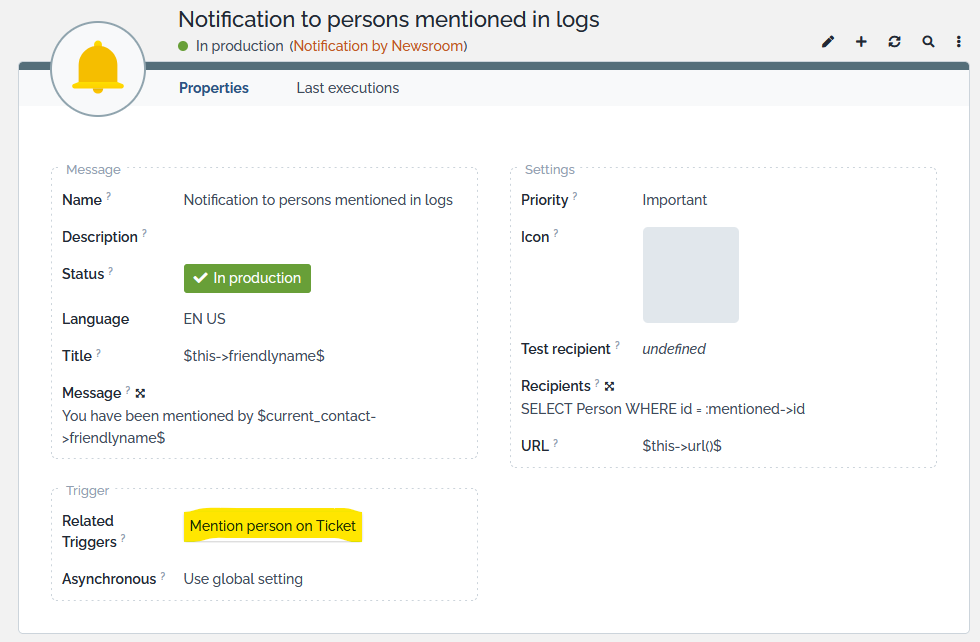
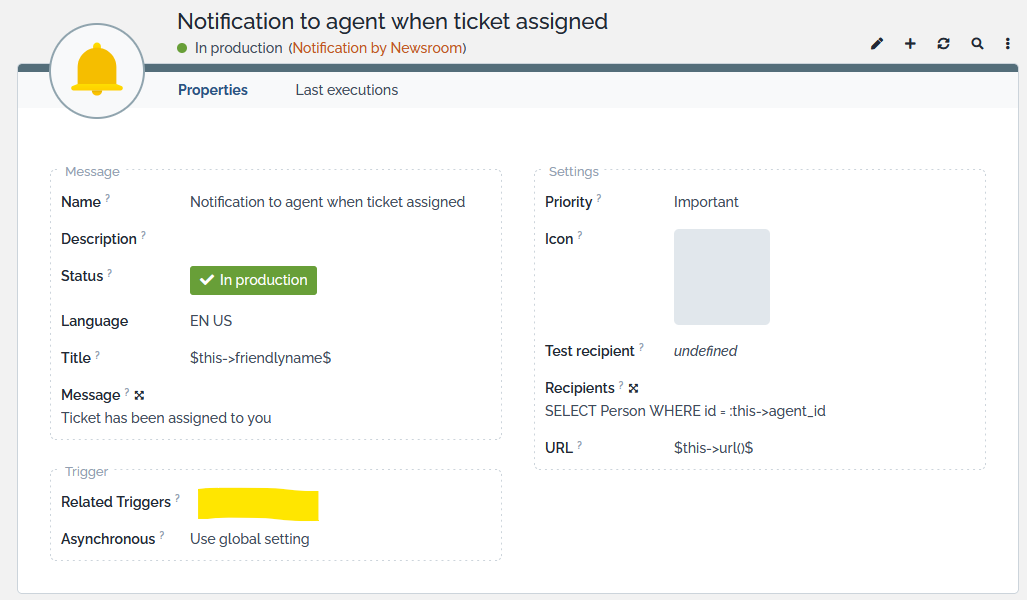
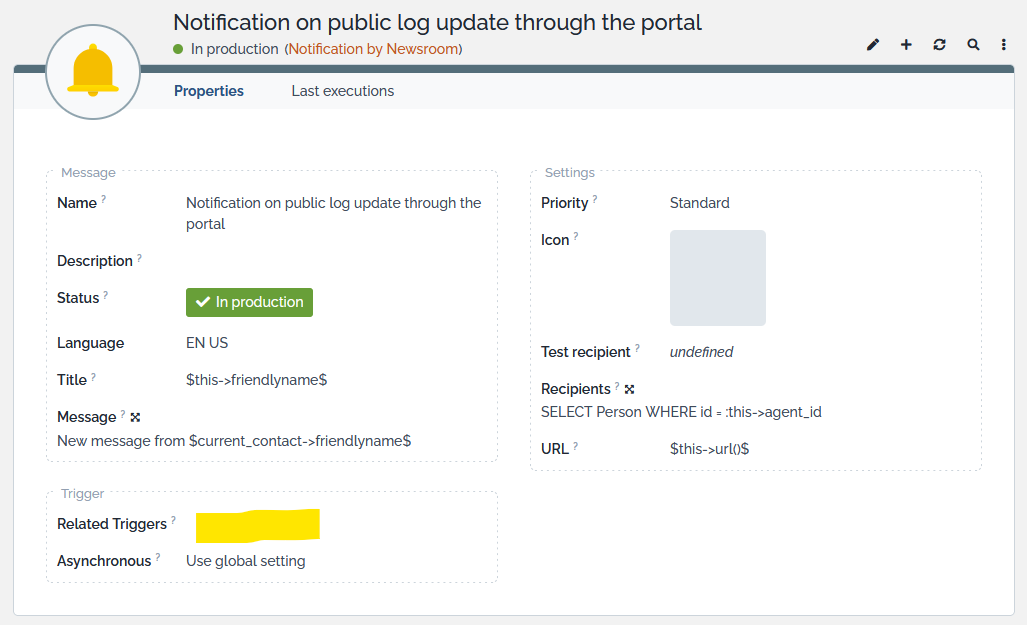
iTop 3.2.0 comes with 3 new actions “Notification by Newsroom”
-
One
Notification to persons mentioned in
logs
automatically linked to all your existing “Trigger (on object mention)” searching for “Person” in the filed “Mentioned filter”
-
One
Notification to agent when ticket
assigned
to be linked with a “Trigger (on entering a state)” on class “User Request” on “state:”assigned
-
One
Notification on public log update through
the portal
to be linked with a “Trigger (when updated from the portal)” and a “Trigger (when updated by mail)” both on class “User Request”
All your “Trigger (on object mention)” triggers have their
“Subscription policy” field (field added in 3.2.0), set to
the value Force at least one channel (News or Email),
because by default we don't want iTop Users to unsubscribe from
all channels when their name is mentioned
somewhere in an object log. 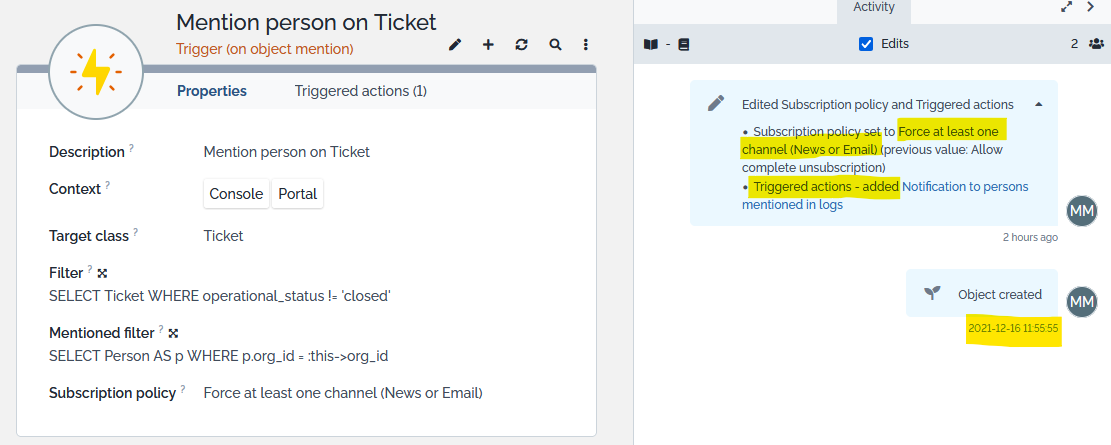
Remove search Brick
If you don't want the new search brick in the standard portal, remove it by adding those lines in the Designer (for Combodo's customers), or create an iTop extension which does this.
    <module_design id="itop-portal" xsi:type="portal">
      <bricks>
        <brick id="manage-all-tickets-for-portal-user" xsi:type="Combodo\iTop\Portal\Brick\ManageBrick" _delta="delete"/>
        <brick id="search-within-tickets-for-portal-user" xsi:type="Combodo\iTop\Portal\Brick\FilterBrick" _delta="delete"/>
      </bricks>
    </module_design>
X-Content-Type-Options HTTP header and CORB protection
Since iTop 2.7.10 / 3.0.4 / 3.1.2 / 3.2.0, the X-Content-Type-Options HTTP header is sent
with the nosniff value. This could trigger CORB
protection for certain resources, preventing them from loading (see
https://chromium.googlesource.com/chromium/src/+/master/services/network/cross_origin_read_blocking_explainer.md#determining-whether-a-response-is-corb_protected).
To mitigate the issue, sending this HTTP header is disabled on
corresponding resources in iTop core.
As some extensions can be impacted, the
security.enable_header_xcontent_type_options config
parameter can be set to false to prevent the
header to be sent.
Downgrade
🚧 Work in progress
Le champ solution contient de l'HTML pour les tickets mis à jour post migration 3.2
Rendering des inline image différent pour les tickets mis à jour post migration 3.2
Erreur d'intégrité pour les actions NewsRoom