
iTop Essential 3.1 to 3.2 Migration Notes
This version of iTop is backward compatible with previous
versions,
However read carefully the topics described in this page to ensure
a smooth migration of your iTop.
-
For a focus on new features check What's new in iTop Essential 3.2
-
For an exhaustive list of changes check the Change Log
Impact on Users
Before migration
-
We have an audit tool to prevent bad surprises
-
Most of the checks listed below can be smoothly and quickly checked on your particular ITSM Designer license by Combodo
-
A few compatible extension versions must be activated and moved to production before upgrading your iTop
Upgrade all extensions
Before trying to upgrade to iTop 3.3, it is very important that you do the following procedure on your iTop 3.2:
-
Connect to your iTop instance
-
Go to the Designer
-
In the “Component” tab, for all extensions you have added to your license, upgrade them to the latest version available
-
Do a “Move to production” to deploy them
This will ensure a smooth migration to iTop 3.3+.
System
PHP version
-
New PHP min version: 8.2.0 (see backward incompatible changes list)
-
New PHP max version: 8.4.x
Database
Database update operations
Extension / Custom code
-
It is required to get the latest version of each of the extensions that you are using, because most of the old versions are not compatible with iTop 3.3
-
The DisplayBareProperties method id in DocumentFile changed from DisplayBareRelations to DisplayBareProperties to be more consistent with the defined function. If you have redefined this method, you will need to change the identifier.
-
If you have developed custom extensions with XML and custom code, check: Developer check-list
Backoffice themes
Using an undeclared SCSS variable as the value for another variable is deprecated. To ensure compliance with Sass specifications, please use static values (e.g., Hex codes) or variables that you defined beforehand.
Portal: Themes & New Look
A new extension must be written following the new standard: Customize Portal (3.3+)
Case 1: You have already installed on iTop 3.2 the extension User Portal: New look for 3.2 LTS, you MUST remove it and any reference to it in your portals
-
module_design/properties/templates/template
-
module_design/properties/themes/theme
For eg. lines like the ones below must be removed (All lines
containing itop-portal-new-look-for-3.2-lts
must be removed and only those!)
- itop_design | module_designs | module_design
-
<themes>
  <theme id="portal" _delta="define">itop-portal-new-look-for-3.2-lts/public/css/portal.scss</theme>
  <theme id="bootstrap" _delta="define">itop-portal-new-look-for-3.2-lts/public/css/bootstrap-theme-combodo.scss</theme>
  <theme id="main" _delta="define">itop-portal-new-look-for-3.2-lts/public/css/main.scss</theme>
</themes>
<templates>
  <template id="layout" _delta="define">itop-portal-new-look-for-3.2-lts/templates/layout.html.twig</template>
  <template id="home" _delta="define">itop-portal-new-look-for-3.2-lts/templates/home/layout.html.twig</template>
  <template id="Combodo\iTop\Portal\Controller\AbstractController:page" _delta="define">itop-portal-new-look-for-3.2-lts/templates/layout.html.twig</template>
  <template id="Combodo\iTop\Portal\Controller\AbstractController:navigation_menu" _delta="define">itop-portal-new-look-for-3.2-lts/templates/pages/navigation_menu.html.twig</template>
  <!-- and so on... -->
And if you have written a CSS extension to customize the style, you will have adapt your extension: remove or replace 2 first lines and last one.
- remove
-
// Replace the 2 lines below
@import '../../../../itop-portal-new-look-for-3.2-lts/public/css/utils/variables/colors/_base-palette';
@import '../../../../itop-portal-new-look-for-3.2-lts/public/css/utils/variables/colors/_semantic-palette';
// By those lines
@import '../../../../itop-portal-base/portal/public/css/utils/variables/colors/_base-palette';
@import '../../../../itop-portal-base/portal/public/css/utils/variables/colors/_semantic-palette';
// Replace
@import "../../../../itop-portal-new-look-for-3.2-lts/public/css/themes/all"
// By
@import "../../../../itop-portal-base/portal/public/css/themes/all"
case 2:
And if you have written a CSS extension to customize the style for old style User portal, because some CSS variables have disappeared and others were created, you will have to write a new extension following this tutorial Customize Portal (3.3+)
Included in iTop
XML Datamodel
As a result your own customization by extensions or Designer may generate XML conflicts with the new version
The way to resolve those conflicts impose to modify your
extensions and/or modify your model in the Designer.
There are different use cases:
-
Node xxx/xxx/xxx already exists so cannot be created
-
Your customization have exactly anticipated the evolution brought by iTop 3.3 Datamodel ⇒ Remove your customization
-
Your customization is different also the node id is the same ⇒ replace the _delta=“define” by a _delta=“define_if_not_exists”
-
-
Node yyy/yyy/yyy not found so cannot be modified/removed
-
if you wanted a removal ⇒ Remove your customization
-
if you wanted a modification ⇒ Check your modification to see if you can just replace the “redefine” by a “define” or if it requires to provide a wider XML branch to be effective.
-
CMDB
This version adds fields to CMDB classes
-
If you have redefined the presentation details of those classes by extension or with the Designer, those enhancements won't be visible in your iTop.
-
If you have done any type of XML customization it can conflict with the 3.3.0 Datamodel changes. First conflict found is reported during iTop Setup, XML compilation phase. The error message identifies the module and node in conflict.
-
For the community, check the exhaustive list in the link above and adapt your XML extension(s)
-
For Combodo's customers, ask for the Migration Audit report, which will identify the conflicts with your customization if any.
-
Service Management
Status Mandatory
-
Service and Service Subcategory
statusare now mandatory.-
Any such object with an
undefinedvalue will becomeimplementationafter upgrade -
Those
undefinedwere not visible in User Portal whileimplementationwere visible (before upgrade) -
After upgrade, unless you have modified those classes scopes in the User Portal
implementationare no more visible in the User Portal except for Users with theService Managerprofile, so they can test new Service Subcategory (especially pertinent with Customized request forms).
-
New Menu groups
-
A new dashboard menu has been added (See iTop 3.3 Community)
If you have reorganized those menus, the new dashboard menu may appears without all its expected sub-menus
Ticketing
-
New field
parent_request_idon class Incident
Copy parent log
-
New prefix on log entries copied from parent Ticket + code refactoring:
-
new method on class Ticket
UpdateChildTicketLogadding a prefix to the log entry copied from the parent Ticket and being more efficient -
Modification of methods UpdateChildRequestLog and UpdateChildIncidentLog on classes UserRequest and Incident, to call Ticket::UpdateChildTicketLog
-
-
The method can be reuse for any log
-
Parent log and child log can be different, you can copy the public parent entry within the private child log if you want.
-
The prefix is associated with the parent Ticket log, so it describes the source. A parent User Request public log entry, will always have the same prefix regardless where it is copied.
  'Class:UserRequest/Method:UpdateChildTicketWith:public_log' => '<i><u>Public log automatic copy from parent User Request %2$s:</u></i><br><br>',
        'Class:UserRequest/Method:UpdateChildTicketWith:private_log' => '<i>Private log automatic copy from parent User Request [[UserRequest:%1$s]]:</i><br><br>',
        'Class:Incident/Method:UpdateChildTicketWith:public_log' => '<i><u>Public log entry from parent Incident %2$s:</u></i><br><br>',
        'Class:Incident/Method:UpdateChildTicketWith:private_log' => '<i>Private log entry from parent Incident [[Incident:%1$s]]:</i><br><br>',
Setup
Configuration file
After Migration
On the ITSM Designer
After you have upgraded your iTop staging instance and connected it to the ITSM Designer, you may want to benefit from available new features
Trigger on Attachment
If you have configured a Trigger (on object
creation) or a Trigger (on object deletion) on
class Attachment, those triggers can no more be modified 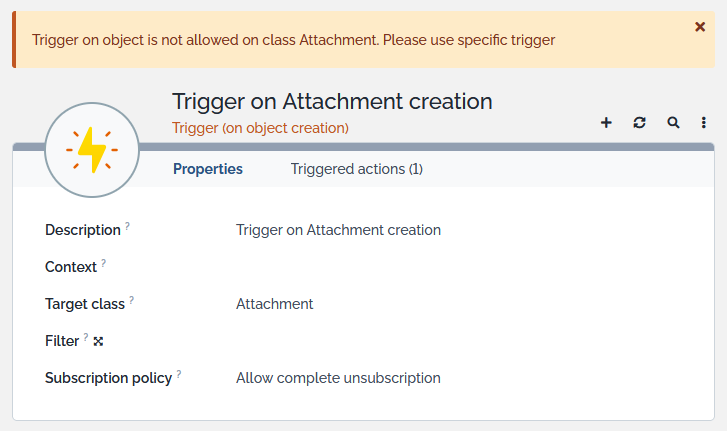
You should replace it with the new classes of trigger brought by version 3.3.0: